หมายเหตุ
การเข้าถึงหน้านี้ต้องได้รับการอนุญาต คุณสามารถลอง ลงชื่อเข้าใช้หรือเปลี่ยนไดเรกทอรีได้
การเข้าถึงหน้านี้ต้องได้รับการอนุญาต คุณสามารถลองเปลี่ยนไดเรกทอรีได้
Azure Backup offers an end-to-end support for backing up SQL Server always on availability groups (AG) if all nodes are in the same region and subscription as the Recovery Services vault. However, if the AG nodes are spread across regions/subscriptions/on-premises and Azure, there are a few considerations to keep in mind.
To view the backup and restore scenarios that we support today, see the support matrix. For common questions, see the frequently asked questions.
Note
Azure Backup doesn't support backing up Basic Availability Group databases.
Backup preference behavior by SQL Server version
Full and differential backup support on secondary replicas depends on SQL Server version. AG backup preference and SQL Server version determine the node chosen for each backup type.
SQL Server 2022 and earlier
The backup preference used by Azure Backup SQL AG supports full and differential backups only from the primary replica. So, these backup jobs always run on the Primary node irrespective of the backup preference. For copy-only full and transaction log backups, the AG backup preference is considered while deciding the node where backup will run.
| AG Backup preference | Full and Diff backups run on | Copy-Only and Log backups are taken from |
|---|---|---|
| Primary | Primary replica | Primary replica |
| Secondary only | Primary replica | Any one of the secondary replicas |
| Prefer Secondary | Primary replica | Secondary replicas are preferred, but backups can run on primary replica also. |
| None/Any | Primary replica | Any replica |
SQL Server 2025 and later
In SQL Server 2025 and later, secondary replicas also support full and differential backups. The backup preference now governs both backup types uniformly. When you set Secondary Only or Prefer Secondary, full and differential backups no longer require the primary node.
| AG Backup preference | Full and Diff backups run on | Copy-Only and Log backups are taken from |
|---|---|---|
| Primary | Primary replica | Primary replica |
| Secondary only | Any one of the secondary replicas | Any one of the secondary replicas |
| Prefer Secondary | Secondary replicas are preferred, but backups can run on primary replica also. | Secondary replicas are preferred, but backups can run on primary replica also. |
| None/Any | Any replica | Any replica |
When you register a node with the Azure Backup service, you install the workload backup extension on that node. When you configure an AG database for backup, the backup schedules are pushed to all the registered nodes of the AG. The schedules fire on all the AG nodes, and the workload backup extensions on these nodes synchronize between themselves to decide which node can perform the backup. The node selection depends on the backup type and the backup preference described in Backup preference behavior by SQL Server version.
The selected node proceeds with the backup job, whereas the job triggered on the other nodes bails out, that is, it skips the job.
Note
Azure Backup doesn’t consider backup priorities or replicas while deciding among the secondary replicas.
Register AG nodes to the Recovery Services vault
A Recovery Services vault supports backup of databases only from VMs in the same region and subscription as of the vault.
SQL Server 2022 and earlier:
- Register the primary node to the vault (otherwise, full backups can't happen).
- Register at least one secondary node to the vault (otherwise, log/copy-only full backups can't happen) if the backup preference is secondary only.
Configuring backups for AG databases fail with the error code FabricSvcBackupPreferenceCheckFailedUserError if the above conditions aren't met.
SQL Server 2025 and later:
- Primary node registration is no longer mandatory for AG backup configuration. Since full and differential backups can now run on secondary replicas, you can configure backups with only secondary nodes registered (when backup preference is Secondary Only or Prefer Secondary).
- For Primary backup preference, the primary node must still be registered.
- Register at least one node that satisfies the chosen backup preference.
Note
The relaxation of the primary node registration requirement is gated by the SQL Server version detected during AG database discovery. If any replica in the AG is running SQL Server 2022 or earlier, the primary node registration requirement remains in effect for that AG.
Let’s consider the following AG deployment as a reference.
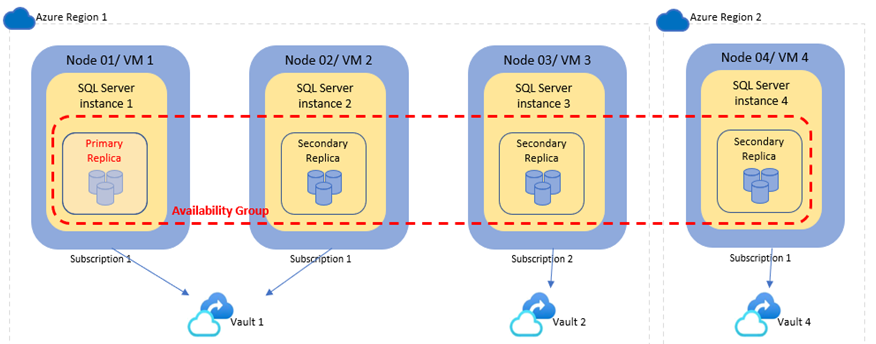
Based on the given sample AG deployment, following are various considerations:
- As the primary node is in region 1 and subscription 1, the Recovery Services vault (Vault 1) must be in Region 1 and Subscription 1 for protecting this AG.
VM3can't be registered to Vault 1 as it's in a different subscription.VM4can't be registered to Vault 1 as it's in a different region.- If the backup preference is secondary only, register VM1 (Primary) and VM2 (Secondary) to Vault 1. On SQL Server 2022 and earlier, full backups require the primary node so register both nodes; on SQL Server 2025 and later, VM2 alone is sufficient. For other backup preferences, register VM1 (Primary) to Vault 1; VM2 is optional.
- While you can register VM3 to vault 2 in subscription 2 and the AG databases would then show up for protection in vault 2, configuring backups would fail on SQL Server 2022 and earlier due to the absence of the primary node in vault 2. On SQL Server 2025 and later, you can configure backups in vault 2 if the backup preference is Secondary Only or Prefer Secondary.
- Similarly, while you can register VM4 to vault 4 in region 2, configuring backups would fail on SQL Server 2022 and earlier since the primary node isn't registered in vault 4. On SQL Server 2025 and later, you can configure backups in vault 4 if the backup preference is Secondary Only or Prefer Secondary.
Handle failover
After the AG has failed over to one of the secondary nodes:
- SQL Server 2022 and earlier: Full and differential backups continue from the new primary node if it's registered to the vault.
- SQL Server 2025 and later: Full and differential backups continue from the node that satisfies the backup preference. For Secondary Only or Prefer Secondary, these backups can run on a secondary replica.
- The log and copy-only full backups will continue from primary/secondary node based on the backup preference.
Note
Log chain breaks do not happen on failover if the failover doesn’t coincide with a backup.
Based on the above sample AG deployment, following are the various failover possibilities:
- Failover to VM2
- Full and differential backups will happen from VM2.
- Log and copy-only full backups will happen from VM1 or VM2 based on backup preference.
- Failover to VM3 (another subscription)
- As backups aren't configured in Vault 2, no backups would happen.
- On SQL Server 2022 and earlier, if the backup preference isn't secondary-only, you can now configure backups in Vault 2 because the primary node is registered in this vault. On SQL Server 2025 and later, you can also configure backups when the registered node in Vault 2 satisfies the selected backup preference. This condition can lead to conflicts or backup failures. For more information, see Configure backups for a multi-region AG.
- Failover to VM4 (another region)
- As backups aren't configured in Vault 4, no backups would happen.
- On SQL Server 2022 and earlier, if the backup preference isn't secondary-only, you can now configure backups in Vault 4 because the primary node is registered in this vault. On SQL Server 2025 and later, you can also configure backups when the registered node in Vault 4 satisfies the selected backup preference. This condition can lead to conflicts or backup failures. For more information, see Configure backups for a multi-region AG.
Configure backups for a multi-region AG
Recovery services vault doesn’t support cross-subscription or cross-region backups. This section summarizes how to enable backups for AGs that are spanning subscriptions or Azure regions and the associated considerations.
Evaluate if you really need to enable backups from all nodes. If one region/subscription has most of the AG nodes and failover to other nodes happens very rarely, setting up the backup in that first region may be enough. If the failovers to other region/subscription happen frequently and for prolonged duration, then you may want to set up backups proactively in the other region as well.
Each vault where the backup gets enabled will have its own set of recovery point chains. Restores from these recovery points can be done to VMs registered in that vault only.
SQL Server 2022 and earlier: Full and differential backups work only in the vault that has the primary node. These backups in other vaults keep failing. On SQL Server 2025 and later, this behavior changes for Secondary Only and Prefer Secondary preferences - see SQL Server 2025: Multi-Region AG backup changes.
Log backups will keep working in the previous vault until a log backup runs in the new vault (that's, in the vault where the new primary node is present) and breaks the log chain for old vault.
Note
There's a hard limit of 15 days beyond which log backups will start failing.
Copy-only full backups will work in all the vaults.
Protection in each vault is treated as a distinct data source and is billed separately.
To avoid log backup conflicts between the two vaults, we recommend you to set the backup preference to Primary. Then, whichever vault has the primary node will also take the log backups.
SQL Server 2025: Multi-region AG backup changes
With SQL Server 2025, full and differential backups no longer require the primary node. This change means:
Primary node registration isn't required — If your backup preference is Secondary Only or Prefer Secondary, you can configure and run backups from any registered secondary node, even if the primary node is in a different region or subscription.
Reduced failover impact — After failover to a node in a different region, backups can continue in the original vault as long as a registered node satisfying the backup preference is available.
However, the fundamental cross-vault coordination limitation remains — backups can't be coordinated between multiple vaults. If you register AG nodes in different vaults across regions, simultaneous backup schedules can conflict and cause log chain breaks or duplicate backups.
Recommendation to avoid cross-vault conflicts:
- 2-node AG: Set backup preference to Secondary Only or Primary.
- 3+ node AG: Set backup preference to Primary.
This configuration ensures only one vault's node is eligible for backups at any time.
Based on the above sample AG deployment, here are the steps to enable backup from all the nodes. The assumption is that backup preference is satisfied in all the steps.
Step 1: Enable backups in Region 1, Subscription 1 (Vault 1)
As the primary node is in region and subscription, the usual steps to enable backups will work.
Step 2: Enable backups in Region 1, Subscription 2 (Vault 2)
- Failover the AG to VM3 so that the primary node is present in Vault 2.
- Configure backups for the AG databases in Vault 2.
- At this point:
- The full/differential backups will fail in Vault 1 as none of the registered nodes can take this backup.
- The log backups will succeed in Vault 1 until a log backup runs in Vault 2 and breaks the log chain for Vault 1.
- Failback the AG to VM1.
Step 3: Enable backups in Region 2, Subscription 1 (Vault 4)
Same as Step 2.
Back up an AG that spans Azure and on-premises
Azure Backup for SQL Server can’t be run on-premises. If the primary node is in Azure and the backup preference is satisfied by the nodes in Azure, you can follow the above guidance for multi-region AG to enable backups for the replicas in Azure. If a failover to on-premises node happens, the full and differential backups in Azure will start failing. Log backups may continue until the log chain break happens/15 days pass.
Throttling for backup jobs in an AG database
Currently, the backup throttling limits apply at an individual machine level. The default limit is 20 – if more than 20 backups are triggered concurrently, first 20 will run and the others will get queued. When the running jobs are complete, the queued ones will start running.
You can change this value to a smaller value if the concurrent backups are causing memory/IO/CPU strain on the node. Since the throttling is at node level, having unbalanced AG nodes can lead to backup synchronization problems. To understand this, consider a 2 nodes AG for instance.
For example, the first node has 50 standalone databases protected and both the nodes have 5 AG databases protected. Effectively, Node 1 has 55 database backup jobs scheduled whereas Node 2 has only 5. Also, all these backups are configured to run at the same time, every hour. At a point, all 55 backups will trigger on Node 1 and 35 of these will get queued. Some of these would be the AG database backups. But on Node 2, the AG database backups would go ahead without any queuing.
As the AG database jobs queue on one node and run on another, backup synchronization doesn't work properly. Node 2 might assume that Node 1 is down and therefore jobs from Node 1 aren't coming up for synchronization. This problem can lead to log chain breaks or extra backups as both nodes can take backups independently.
Similar problem can happen if the number of AG databases protected is more than the throttling limit. In such case, backup for, say, DB1 can be queued on Node 1 whereas it runs on Node 2.
We recommend you to use the following backup preferences to avoid these synchronization issues:
- For a 2 node AG, set the Backup Preference to Primary or Secondary Only – then only one node can do the backups, the other will always bail out.
- For an AG with more than 2 nodes, set the Backup Preference to Primary – then only primary node can do the backups, others will bail out.
Billing for AG backups
Same as a standalone SQL instance, one backed-up AG instance is considered as one protected instance. Total frontend size of all protected databases in an instance is charged. Consider the following deployment:
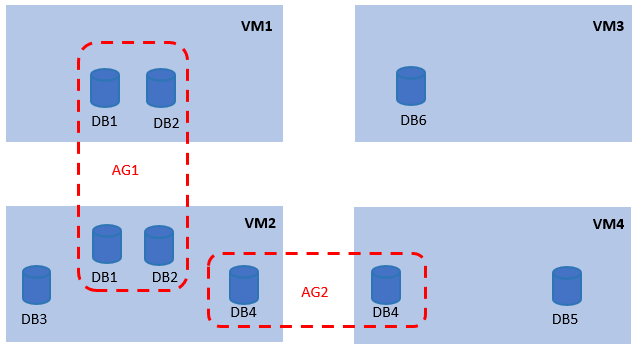
The protected instances are calculated as follows:
| Protected Instance/ Billing instance | Databases considered for calculating frontend size |
|---|---|
| AG1 | DB1, DB2 |
| AG2 | DB4 |
| VM2 | DB3 |
| VM3 | DB6 |
| VM4 | DB5 |
Move a protected database in or out of an AG
Azure Backup considers SQL instance or AG name\Database name as the database unique name. When the standalone DB was protected, its unique name was StandAloneInstanceName\DBName. When it moves under an AG, the unique name changes to AGName\DBName. The backups for the standalone database will start failing with error code: UserErrorBackupFailedStandaloneDatabaseMovedInToAG.
The database must be configured for protection from under the AG. This will be treated as a new data source with a separate recovery point chain. The older protection of standalone database can be stopped with retain data to avoid future backups from triggering and failing on it. Similarly, when a protected AG database moves out of AG and becomes standalone database, its backups start failing with error code: UserErrorBackupFailedDatabaseMovedOutOfAG.
The database must be configured for protection from under the standalone instance. This will be treated as a new data source with a separate recovery point chain. The older protection of AG database can be stopped with retain data to avoid future backups from triggering and failing on it.
Addition or removal of a node to an AG
When a new node gets added to an AG that is configured for backups, the workload backup extensions running on the already registered AG nodes detect the AG topology change and inform the Azure Backup service during the next scheduled database discovery job. When this new node gets registered for backups to the same Recovery Services vault as the other existing nodes, Azure Backup service triggers a workflow that configures this new node with the necessary metadata for performing AG backups.
After this step, the new node syncs the AG backup schedule information from the Azure Backup service and starts participating in the synchronized backup process. If the new node isn't able to sync the backup schedules and participate in backups, triggering a re-registration on the node forces reconfiguration of the node for AG backups as well. Similarly, during node removal, the workload extensions detect the AG topology change and inform the Azure Backup service. The service starts a node un-configuration workflow on the removed node to clear the backup schedules for AG databases and delete the AG related metadata.
Unregister an AG node from Azure Backup
If a node is part of an AG that has one or more databases configured for backup, then Azure Backup doesn’t allow un-registration of that node. This is to prevent future backup failures in case the backup preference can’t be met without this node. To unregister the node, first you need to remove it from the AG. When the node un-configuration workflow completes, cleaning up that node, you can unregister it.
Restore a database from Azure Backup to an AG SQL Availability Groups don't support directly restoring a database into AG. The database needs to be restored to a standalone SQL instance and then needs to be joined to an AG.
Availability group re-creation scenarios for the SQL database server
Re-creation of Availability group (AG), duplicate AGs, and the backup items get listed as protectable items or protected items in the following scenarios:
Re-creating AGs that are already protected appear as duplicate AGs on the Configure Backup page and in the Protected items list. If you want to retain the backup data that is already present in the older AG, then stop the backup by using the Stop protection and retain data option before re-creating and scheduling backups on the new AG items.
By design, Azure Backup lists the duplicate items on the Protected items list, and the Configure Backup page or Protectable item list and displays these items until you want to retain the backup data.
If you don't want the backup data from the older AG, then stop the backup operation by using the Stop protection and delete data option for the older item before re-creating and scheduling backups on the new AG.
Caution
Stop protection and delete data is a destructive operation.
You can recreate the AG after performing one of the above Stop protection process to avoid backup failures.
SQL Server 2025 AG backup considerations
Backup preference changes after configuration
If you change the AG backup preference but don't register the required node to the vault, backups fail. For example, if you change the preference from Primary to Secondary Only but no secondary node is registered, log and Full/Diff backups fail. Always ensure that nodes satisfying the new backup preference are registered to the vault before making the change.
Multi-region AG backup coordination
When you protect AG nodes across multiple vaults in different regions, vaults can't coordinate backups between them, regardless of the SQL Server version. For guidance on backup preference settings that avoid log chain breaks and duplicate backups in this scenario, see SQL Server 2025: Multi-Region AG backup changes.
Snapshot backup support
Snapshot backups are not supported on secondary replicas of an AG. When you enable snapshot backup on the backup policy, primary node registration remains mandatory regardless of SQL Server version.
Next steps
Learn how to:
Related content
- Back up SQL server databases in Azure VMs using Azure Backup via REST API.
- Restore SQL Server databases in Azure VMs with REST API.
- Manage SQL server databases in Azure VMs with Azure portal, Azure CLI, REST API.