Notitie
Voor toegang tot deze pagina is autorisatie vereist. U kunt proberen u aan te melden of de directory te wijzigen.
Voor toegang tot deze pagina is autorisatie vereist. U kunt proberen de mappen te wijzigen.
Van toepassing op: SQL Server
In dit artikel worden manieren beschreven om beschadigde extensies te identificeren die niet correct zijn geïnstalleerd, correct worden uitgevoerd of niet zijn verbonden met Azure.
Beschadigde extensies identificeren
Het ingebouwde dashboard voor extensiestatus gebruiken in de Azure-portal
U kunt het built-in-extensiestatusdashboard in de Azure-portal gebruiken om de status weer te geven voor alle geïmplementeerde Azure-extensies voor SQL Server.
Fooi
Maak uw eigen aangepaste dashboard met dit bestand vanuit de sql-server-samples GitHub opslagplaats: Arc-enabled SQL Server Health.json.
Query ongezonde extensies met Azure Resource Graph
Gebruik Azure Resource Graph om de status te identificeren van de Azure-extensie voor SQL Server op uw servers met Azure Arc ingeschakeld.
Fooi
Als u nog niet bekend bent, leert u meer over Azure Resource Graph:
Deze query retourneert instanties van SQL Server op servers waarop extensies zijn geïnstalleerd, maar niet gezond zijn.
resources
| where type == "microsoft.hybridcompute/machines/extensions"
| where properties.type in ("WindowsAgent.SqlServer", "LinuxAgent.SqlServer")
| extend targetMachineName = tolower(tostring(split(id, '/')[8])) // Extract the machine name from the extension's id
| join kind=leftouter (
    resources
    | where type == "microsoft.hybridcompute/machines"
    | project machineId = id, MachineName = name, subscriptionId, LowerMachineName = tolower(name), resourceGroup , MachineStatus= properties.status , MachineProvisioningStatus= properties.provisioningState, MachineErrors = properties.errorDetails //Project relevant machine health information.
) on $left.targetMachineName == $right.LowerMachineName and $left.resourceGroup == $right.resourceGroup and $left.subscriptionId == $right.subscriptionId // Join Based on MachineName in the id and the machine's name, the resource group, and the subscription. This join allows us to present the data of the machine as well as the extension in the final output.
| extend statusExpirationLengthRange = 3d // Change this value to change the acceptable range for the last time an extension should have reported its status.
| extend startDate = startofday(now() - statusExpirationLengthRange), endDate = startofday(now()) // Get the start and end position for the given range.
| extend extractedDateString = extract("timestampUTC : (\\d{4}\\W\\d{2}\\W\\d{2})", 1, tostring(properties.instanceView.status.message)) // Extracting the date string for the LastUploadTimestamp. Is empty if none is found.
| extend extractedDateStringYear = split(extractedDateString, '/')[0], extractedDateStringMonth = split(extractedDateString, '/')[1], extractedDateStringDay = split(extractedDateString, '/')[2] // Identifying each of the parts of the date that was extracted from the message.
| extend extractedDate = todatetime(strcat(extractedDateStringYear,"-",extractedDateStringMonth,"-",extractedDateStringDay,"T00:00:00Z")) // Converting to a datetime object and rewriting string into ISO format because todatetime() does not work using the previous format.
| extend isNotInDateRange = not(extractedDate >= startDate and extractedDate <= endDate) // Created bool which is true if the date we extracted from the message is not within the specified range. This bool will also be true if the date was not found in the message.
| where properties.instanceView.status.message !contains "SQL Server Extension Agent: Healthy" // Begin searching for unhealthy extensions using the following 1. Does extension report being healthy. 2. Is last upload within the given range. 3. Is the upload status in an OK state. 4. Is provisioning state not in a succeeded state.
    or isNotInDateRange
    or properties.instanceView.status.message !contains "uploadStatus : OK"
    or properties.provisioningState != "Succeeded"
    or MachineStatus != "Connected"
| extend FailureReasons = strcat( // Makes a String to list all the reason that this resource got flagged for
        iif(MachineStatus != "Connected",strcat("- Machine's status is ", MachineStatus," -"),"") ,
        iif(MachineErrors != "[]","- Machine reports errors -", ""),
        iif(properties.instanceView.status.message !contains "SQL Server Extension Agent: Healthy","- Extension reported unhealthy -",""),
        iif(isNotInDateRange,"- Last upload outside acceptable range -",""),
        iif(properties.instanceView.status.message !contains "uploadStatus : OK","- Upload status is not reported OK -",""),
        iif(properties.provisioningState != "Succeeded",strcat("- Extension provisiong state is ", properties.provisioningState," -"),"")
    )
| extend RecommendedAction = //Attempt to Identify RootCause based on information gathered, and point customer to what they should investigate first.
    iif(MachineStatus == "Disconnected", "Machine is disconnected. Please reconnect the machine.",
        iif(MachineStatus == "Expired", "Machine cert is expired. Go to the machine on the Azure portal for more information on how to resolve this issue.",
            iif(MachineStatus != "Connected", strcat("Machine status is ", MachineStatus,". Investigate and resolve this issue."),
                iif(MachineProvisioningStatus != "Succeeded", strcat("Machine provisioning status is ", MachineProvisioningStatus, ". Investigate and resolve machine provisioning status"),
                    iff(MachineErrors != "[]", "Machine is reporting errors. Investigate and resolve machine errors",
                        iif(properties.provisioningState != "Succeeded", strcat("Extension provisioning status is ", properties.provisioningState,". Investigate and resolve extension provisioning state."),
                            iff(properties.instanceView.status.message !contains "SQL Server Extension Agent:" and properties.instanceView.status.message contains "SQL Server Extension Agent Deployer", "SQL Server extension employer ran. However, SQL Server extension seems to not be running. Verify that the extension is currently running.",
                                iff(properties.instanceView.status.message !contains "uploadStatus : OK" or isNotInDateRange or properties.instanceView.status.message !contains "SQL Server Extension Agent: Healthy", "Extension reported as unhealthy. View FailureReasons and LastExtensionStatusMessage for more information as to the cause of the failure.",
                                    "Unable to recommend actions. Please view FailureReasons."
                                )
                            )
                        )
                    )
                )
            )
        )
    )
| project ID = id, MachineName, ResourceGroup = resourceGroup, SubscriptionID = subscriptionId, Location = location, RecommendedAction, FailureReasons, LicenseType = properties.settings.LicenseType,
    LastReportedExtensionHealth = iif(properties.instanceView.status.message !contains "SQL Server Extension Agent: Healthy", "Unhealthy", "Healthy"),
    LastExtensionUploadTimestamp = iif(indexof(properties.instanceView.status.message, "timestampUTC : ") > 0,
        substring(properties.instanceView.status.message, indexof(properties.instanceView.status.message, "timestampUTC : ") + 15, 10),
        "no timestamp"),
    LastExtensionUploadStatus = iif(indexof(properties.instanceView.status.message, "uploadStatus : OK") > 0, "OK", "Unhealthy"),
    ExtensionProvisioningState = properties.provisioningState,
    MachineStatus, MachineErrors, MachineProvisioningStatus,MachineId = machineId,
    LastExtensionStatusMessage = properties.instanceView.status.message
Als u mogelijke problemen wilt identificeren, controleert u de waarde in de kolom RecommendedAction of de kolom FailureReasons. De kolom RecommendedAction biedt mogelijke eerste stappen voor het oplossen van het probleem of aanwijzingen voor wat u eerst moet controleren. In de kolom FailureReasons worden de redenen vermeld waarom de resource als ongezond wordt beschouwd. Controleer ten slotte LastExtensionStatusMessage om het laatst gerapporteerde bericht van de agent te zien.
Aanbevelingen
| Aanbevolen actie | Actiedetails |
|---|---|
| Het certificaat van de machine is verlopen. Ga naar de computer in de Azure-portal voor meer informatie over het oplossen van dit probleem. |
De machine met Arc moet opnieuw worden ge onboardd naar Arc omdat het certificaat dat wordt gebruikt voor verificatie bij Azure verlopen is. De status van de Arc-machine is Expired in de Azure-portal. U kunt de agent verwijderen en vervolgens opnieuw onboarden. U hoeft de Arc-ingeschakelde SQL Server-resources in de portal niet te verwijderen als u zich opnieuw aanmeldt. De SQL-extensie wordt automatisch opnieuw geïnstalleerd zolang auto-onboarding is ingeschakeld (standaard). |
| De verbinding met de computer is verbroken. Sluit de computer opnieuw aan. |
De Arc-machine bevindt zich in een state = Disconnected. Deze status kan om verschillende redenen zijn:Arc connected machine agent is gestopt, uitgeschakeld of constant aan het crashen is. of De verbinding tussen de agent en Azure wordt geblokkeerd. Controleer de status van de met Arc verbonden machineservices/daemons om ervoor te zorgen dat deze zijn ingeschakeld enworden uitgevoerd. Controleer de connectiviteit. Problemen met de agent oplossen met behulp van het uitgebreide logboek. |
| Extensie gemeld als ongezond. Bekijk FailureReasons en LastExtensionStatusMessage voor meer informatie over de oorzaak van de fout. Laatste upload buiten acceptabel bereik (binnen de afgelopen drie dagen). |
Controleer de kolom LastExtensionUploadTimestamp. Als het No timestamp is, worden er nooit inventaris- of gebruiksgegevens gerapporteerd aan Azure.
Problemen met de connectiviteit met de gegevensverwerkingsservice en telemetrie-eindpunten oplossen. Als de laatste upload buiten het acceptabele bereik valt (binnen de afgelopen drie dagen) en alles er anders uitziet, zoals LastExtensionUploadStatus, ExtensionProvisioningState en MachineStatus, is het mogelijk dat de Azure-extensie voor SQL Server service/daemon is gestopt. Achterhalen waarom het is gestopt en opnieuw starten. Controleer de LastExtensionStatusMessage op andere aanwijzingen over het probleem. |
| De voorzieningsstatus van de extensie is Mislukt. De provisioneringsstatus van extensies onderzoeken en oplossen. |
De eerste installatie van de SQL-extensie of de update is mislukt.Problemen oplossen met Azure extensie voor implementatie van SQL Server. Controleer de waarde in de LastExtensionStatusMessage. |
| Uploadstatus wordt niet gerapporteerd OK | Controleer de kolom LastExtensionMessage in het dashboard en bekijk de waarde uploadStatus en de uploadMessage waarde (indien aanwezig, afhankelijk van de versie). De waarde uploadStatus is doorgaans een HTTP-foutcode. Bekijk Foutcodes oplossen. De uploadMessage kan meer specifieke informatie bevatten. Problemen met de connectiviteit met de gegevensverwerkingsservice en telemetrie-eindpunten oplossen. |
| De inrichtingsstatus van de extensie is bijwerken of De inrichtingsstatus van de extensie is Het maken van of De inrichtingsstatus van de extensie is Mislukt of De inrichtingsstatus van de extensie is aan het verwijderen |
Als een bepaalde extensie langer dan 30 minuten een van deze statussen blijft, is er waarschijnlijk een probleem met de provisionering. Verwijder de extensie en installeer deze opnieuw met behulp van de CLI of portal. Als het probleem zich blijft voordoen, controleert de implementatie- en extensielogboeken. Als het maken van de extensie mislukt, controleert u of de agent is verbonden en de bijbehorende agentservices worden uitgevoerd. Als het verwijderen mislukt, probeer dan de agent te verwijderen en indien nodig de Arc-machineresource in de portal te verwijderen, en implementeer deze vervolgens opnieuw. U kunt de agent verwijderen en vervolgens opnieuw onboarden. |
Beschadigde extensie identificeren (PowerShell)
Dit voorbeeld wordt uitgevoerd in PowerShell. Het voorbeeld retourneert hetzelfde resultaat als de vorige query, maar via een PowerShell-script.
# PowerShell script to execute an Azure Resource Graph query using Azure CLI
# where the extension status is unhealthy or the extension last upload time isn't in this month or the previous month.

# Requires the Az.ResourceGraph PowerShell module

# Login to Azure if needed
#az login

# Define the Azure Resource Graph query
$query = @"
resources
| where type == "microsoft.hybridcompute/machines/extensions"
| where properties.type in ("WindowsAgent.SqlServer", "LinuxAgent.SqlServer")
| extend targetMachineName = tolower(tostring(split(id, '/')[8])) // Extract the machine name from the extension's id
| join kind=leftouter (
    resources
    | where type == "microsoft.hybridcompute/machines"
    | project machineId = id, MachineName = name, subscriptionId, LowerMachineName = tolower(name), resourceGroup , MachineStatus= properties.status , MachineProvisioningStatus= properties.provisioningState, MachineErrors = properties.errorDetails //Project relevant machine health information.
) on $left.targetMachineName == $right.LowerMachineName and $left.resourceGroup == $right.resourceGroup and $left.subscriptionId == $right.subscriptionId // Join Based on MachineName in the id and the machine's name, the resource group, and the subscription. This join allows us to present the data of the machine as well as the extension in the final output.
| extend statusExpirationLengthRange = 3d // Change this value to change the acceptable range for the last time an extension should have reported its status.
| extend startDate = startofday(now() - statusExpirationLengthRange), endDate = startofday(now()) // Get the start and end position for the given range.
| extend extractedDateString = extract("timestampUTC : (\\d{4}\\W\\d{2}\\W\\d{2})", 1, tostring(properties.instanceView.status.message)) // Extracting the date string for the LastUploadTimestamp. Is empty if none is found.
| extend extractedDateStringYear = split(extractedDateString, '/')[0], extractedDateStringMonth = split(extractedDateString, '/')[1], extractedDateStringDay = split(extractedDateString, '/')[2] // Identifying each of the parts of the date that was extracted from the message.
| extend extractedDate = todatetime(strcat(extractedDateStringYear,"-",extractedDateStringMonth,"-",extractedDateStringDay,"T00:00:00Z")) // Converting to a datetime object and rewriting string into ISO format because todatetime() does not work using the previous format.
| extend isNotInDateRange = not(extractedDate >= startDate and extractedDate <= endDate) // Created bool which is true if the date we extracted from the message is not within the specified range. This bool will also be true if the date was not found in the message.
| where properties.instanceView.status.message !contains "SQL Server Extension Agent: Healthy" // Begin searching for unhealthy extensions using the following 1. Does extension report being healthy. 2. Is last upload within the given range. 3. Is the upload status in an OK state. 4. Is provisioning state not in a succeeded state.
    or isNotInDateRange
    or properties.instanceView.status.message !contains "uploadStatus : OK"
    or properties.provisioningState != "Succeeded"
    or MachineStatus != "Connected"
| extend FailureReasons = strcat( // Makes a String to list all the reason that this resource got flagged for
        iif(MachineStatus != "Connected",strcat("- Machine's status is ", MachineStatus," -"),"") ,
        iif(MachineErrors != "[]","- Machine reports errors -", ""),
        iif(properties.instanceView.status.message !contains "SQL Server Extension Agent: Healthy","- Extension reported unhealthy -",""),
        iif(isNotInDateRange,"- Last upload outside acceptable range -",""),
        iif(properties.instanceView.status.message !contains "uploadStatus : OK","- Upload status is not reported OK -",""),
        iif(properties.provisioningState != "Succeeded",strcat("- Extension provisiong state is ", properties.provisioningState," -"),"")
    )
| extend RecommendedAction = //Attempt to Identify RootCause based on information gathered, and point customer to what they should investigate first.
    iif(MachineStatus == "Disconnected", "Machine is disconnected. Please reconnect the machine.",
        iif(MachineStatus == "Expired", "Machine cert is expired. Go to the machine on the Azure portal for more information on how to resolve this issue.",
            iif(MachineStatus != "Connected", strcat("Machine status is ", MachineStatus,". Investigate and resolve this issue."),
                iif(MachineProvisioningStatus != "Succeeded", strcat("Machine provisioning status is ", MachineProvisioningStatus, ". Investigate and resolve machine provisioning status"),
                    iff(MachineErrors != "[]", "Machine is reporting errors. Investigate and resolve machine errors",
                        iif(properties.provisioningState != "Succeeded", strcat("Extension provisioning status is ", properties.provisioningState,". Investigate and resolve extension provisioning state."),
                            iff(properties.instanceView.status.message !contains "SQL Server Extension Agent:" and properties.instanceView.status.message contains "SQL Server Extension Agent Deployer", "SQL Server extension employer ran. However, SQL Server extension seems to not be running. Verify that the extension is currently running.",
                                iff(properties.instanceView.status.message !contains "uploadStatus : OK" or isNotInDateRange or properties.instanceView.status.message !contains "SQL Server Extension Agent: Healthy", "Extension reported as unhealthy. View FailureReasons and LastExtensionStatusMessage for more information as to the cause of the failure.",
                                    "Unable to recommend actions. Please view FailureReasons."
                                )
                            )
                        )
                    )
                )
            )
        )
    )
| project ID = id, MachineName, ResourceGroup = resourceGroup, SubscriptionID = subscriptionId, Location = location, RecommendedAction, FailureReasons, LicenseType = properties.settings.LicenseType,
    LastReportedExtensionHealth = iif(properties.instanceView.status.message !contains "SQL Server Extension Agent: Healthy", "Unhealthy", "Healthy"),
    LastExtensionUploadTimestamp = iif(indexof(properties.instanceView.status.message, "timestampUTC : ") > 0,
        substring(properties.instanceView.status.message, indexof(properties.instanceView.status.message, "timestampUTC : ") + 15, 10),
        "no timestamp"),
    LastExtensionUploadStatus = iif(indexof(properties.instanceView.status.message, "uploadStatus : OK") > 0, "OK", "Unhealthy"),
    ExtensionProvisioningState = properties.provisioningState,
    MachineStatus, MachineErrors, MachineProvisioningStatus,MachineId = machineId,
    LastExtensionStatusMessage = properties.instanceView.status.message
"@

# Execute the Azure Resource Graph query
$result = Search-AzGraph -Query $query

# Output the results
$result | Format-Table -Property ExtensionHealth, LastUploadTimestamp, LastUploadStatus, Message
Als u mogelijke problemen wilt identificeren, controleert u de waarde in de kolom RecommendedAction of de kolom FailureReasons. De kolom RecommendedAction biedt mogelijke eerste stappen voor het oplossen van het probleem of aanwijzingen voor wat u eerst moet controleren. In de kolom FailureReasons worden de redenen vermeld waarom de resource als ongezond wordt beschouwd. Controleer ten slotte LastExtensionStatusMessage om het laatst gerapporteerde bericht van de agent te zien.
Ontbrekende updates voor extensies identificeren
Extensies identificeren zonder recente statusupdates. Deze query retourneert een lijst met Azure extensies voor SQL Server gesorteerd op het aantal dagen sinds de extensie de status voor het laatst heeft bijgewerkt. Een waarde van '-1' geeft aan dat de extensie is vastgelopen en dat er een callstack in de extensiestatus staat.
// Show the timestamp extracted
// If an extension has crashed (i.e. no heartbeat), fill timestamp with "1900/01/01, 00:00:00.000"
//
resources
| where type =~ 'microsoft.hybridcompute/machines/extensions'
| extend extensionStatus = parse_json(properties).instanceView.status.message
| extend timestampExtracted = extract(@"timestampUTC\s*:\s*(\d{4}/\d{2}/\d{2}, \d{2}:\d{2}:\d{2}\.\d{3})", 1, tostring(extensionStatus))
| extend timestampNullFilled = iff(isnull(timestampExtracted) or timestampExtracted == "", "1900/01/01, 00:00:00.000", timestampExtracted)
| extend timestampKustoFormattedString = strcat(replace(",", "", replace("/", "-", replace("/", "-", timestampNullFilled))), "Z")
| extend agentHeartbeatUtcTimestamp = todatetime(timestampKustoFormattedString)
| extend agentHeartbeatLagInDays = datetime_diff('day', now(), agentHeartbeatUtcTimestamp)
| project id, extensionStatus, agentHeartbeatUtcTimestamp, agentHeartbeatLagInDays
| limit 100
| order by ['agentHeartbeatLagInDays'] asc
Deze query retourneert een aantal extensies gegroepeerd op het aantal dagen sinds de extensie de status voor het laatst heeft bijgewerkt. Een waarde van '-1' geeft aan dat de extensie is vastgelopen en dat er een callstack in de extensiestatus staat.
// Aggregate by timestamp
//
// -1: Crashed extension with no heartbeat, we got a stacktrace instead
//  0: Healthy
// >1: Stale/Offline
//
resources
| where type =~ 'microsoft.hybridcompute/machines/extensions'
| extend extensionStatus = parse_json(properties).instanceView.status.message
| extend timestampExtracted = extract(@"timestampUTC\s*:\s*(\d{4}/\d{2}/\d{2}, \d{2}:\d{2}:\d{2}\.\d{3})", 1, tostring(extensionStatus))
| extend timestampNullFilled = iff(isnull(timestampExtracted) or timestampExtracted == "", "1900/01/01, 00:00:00.000", timestampExtracted)
| extend timestampKustoFormattedString = strcat(replace(",", "", replace("/", "-", replace("/", "-", timestampNullFilled))), "Z")
| extend agentHeartbeatUtcTimestamp = todatetime(timestampKustoFormattedString)
| extend agentHeartbeatLagInDays = iff(agentHeartbeatUtcTimestamp == todatetime("1900/01/01, 00:00:00.000Z"), -1, datetime_diff('day', now(), agentHeartbeatUtcTimestamp))
| summarize numExtensions = count() by agentHeartbeatLagInDays
| order by numExtensions desc
Verwijderde resource wordt nog steeds weergegeven in de Azure-portal
Opmerking
Nadat u verwijderen een SQL Server - Azure Arcresource, wordt de resource mogelijk gedurende een bepaalde periode weergegeven in de Azure-portal. Dit gedrag wordt verwacht en wordt veroorzaakt door Azure Resource Manager caching. De resource verdwijnt doorgaans nadat de cache is vernieuwd. Als de resource na enkele uren nog steeds wordt weergegeven, kunt u controleren of deze is verwijderd door een query uit te voeren op Azure Resource Graph of door de Azure CLI te gebruiken. Er is geen verdere actie vereist. De resource is niet functioneel en er worden geen kosten in rekening gebracht na het verwijderen.
De extensie upgraden
Bekijk de releaseopmerkingen om de versie van de huidige extensierelease te bepalen.
Gebruik de volgende PowerShell-opdracht om de versie van uw extensie te controleren:
azcmagent version
Als u uitbreidingsupgrades wilt vereenvoudigen, moet u automatische updates inschakelen. U kunt de extensie ook handmatig upgraden met behulp van de Azure-portal, PowerShell en de Azure CLI.
Voer de volgende stappen uit om de extensie bij te werken in de Azure-portal:
Ga in de Azure portal naar Machines - Azure Arc.
Selecteer de naam van de computer waarop SQL Server is geïnstalleerd om het deelvenster Overview voor uw server te openen.
Selecteer Extensies onder Instellingen.
Schakel het selectievakje voor de
WindowsAgent.SqlServerextensie in en selecteer Vervolgens Bijwerken in het navigatiemenu.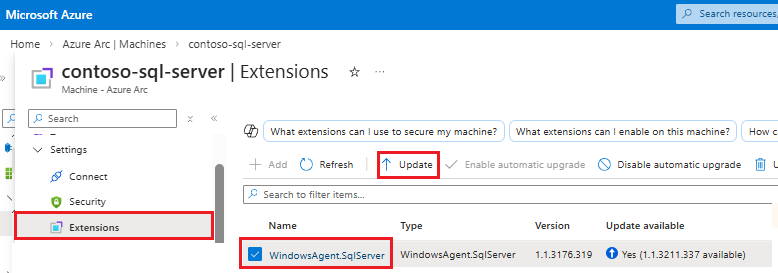
Selecteer Ja in het bevestigingsvenster van de update-extensie om de upgrade te voltooien.
Zie Upgrade extension voor meer informatie over het upgraden van de Azure-extensie voor SQL Server.