Note
Access to this page requires authorization. You can try signing in or changing directories.
Access to this page requires authorization. You can try changing directories.
Microsoft Readiness
Learn how to use the Operations Readiness resource gallery. This is only available to members of organizations that are active in the Microsoft AI Cloud Partner Program. View this resource on user management in Volume Licensing Central.

Support paths and resources for different programs
Volume Licensing (VL)/Services Provider License Agreement (SPLA)/Independent Software Vendor Commercial Full-Packaged Product (ISV CFPP)/Azure*/Devices:
Level 1 Support:
Escalation:
- Regional Operations BOT (R.O.B.) *Not applicable to Devices. You can also escalate by typing the word "ESCALATE" in the email body of the response received from My Cases and Support in Volume Licensing Central. Responses from manual "ESCALATE" will take extra time.
More resources:
Dynamics Solution Provider Agreement (SPA)
Live Chat:
Level 1 Support:
Escalation:
When your request hasn't been resolved to your satisfaction, or is outside of SLA, you can escalate quoting your case number:
Europe: dynesceng@microsoft.com
Asia: emapoc@microsoft.com
Americas: emaoc@microsoft.com
More resources:
Dynamics on-premises resources on the new Microsoft partner site
Azure*
Level 1 Support:
More resources:
Azure fraud detection and notification
Refer to Azure Appendix A for support topics.
CSP
Level 1 Support:
Escalation:
- Schedule a support appointment.
More resources:
End customer escalation can be prioritized in Advanced support for partners.
Microsoft AI Cloud Partner Program
Level 1 Support:
More resources:
Volume Licensing Service Center (VLSC)
Level 1 Support:
- Support Center contact information
Escalation:
- Contact via phone numbers provided in the Support Center contact information
OEM
Level 1 Support:
Azure Appendix A
For the following Azure Support topics, raise a ticket via Azure help + support; otherwise create a case using the My Cases and Support workspace in Volume Licensing Central. To ensure speedy and accurate resolution to your Azure support requests, we recommend reaching out to the relevant team.
Azure activation email – resend
Retriggering Azure activation email
If the request comes through My Cases and Support in Volume Licensing Central, the Regional Operations Center (ROC) retriggers the activation mail.
If the request comes to Azure Operations support, Azure Operations support retriggers the activation mail.
Azure marketplace queries
Azure service-related enquiries
Azure overage invoice queries
Azure overage invoice queries (with post-November 2017 coverage end date)
- Credit and rebill request for overage invoices
- Change purchase order (PO) for overage invoice
- Queries on billing cycle of overage, charges billed separately
- Azure overage adjustment requests related to ship-to and tax-related requests
- Azure Overage calculation (quantity/price)
Azure adjustments
Managing Azure Service related adjustments
- Promo credits
- SLA credits due to technical issues
- Credits due to internal pricing and quantity errors
- Azure RI adjustment
- Application of ACD credits
- CPE credits
- Consumption credits
- OMS, CPP PO credit and rebill
Azure overage offset
Requests to offset Azure overage from Azure MC
- Azure enrollment, account, and subscription transfer requests
Enrollment transfer (all subscriptions), account transfer, and subscriptions transfer (few subscriptions only) requests
- Consumption report and billing reconciliation queries
Examples:
- Azure RI return and refund
- Azure marketplace charges
- EA portal consumption reporting
Incorrect Azure consumption rates
Additional Support Paths
How to engage and seek support—partner lifecycle operations
- Partner onboarding
- Partner contracting
- Partner mergers and acquisitions
- Partner offboarding
Channel partner agreements (VL Disti/Reseller/SPLA/ISV)
Level 1 support tool:
- Contact the new email for support.
From Level 1 support contact:
- EMEA Operations Center (EOC) channel contracts
- Asia Pacific Operations Center (APOC) channel partner agreements
- Latin American Operations Center (LOC) channel partner agreements
- Americas Operations Center (AOC) channel partner agreements
To new global Level 1 support contact:
Microsoft Business Solutions (MBS) – Dynamics
Level 1 support tool:
- Log a support ticket through the PartnerSource Business Center (PSBC) portal
From Level 1 support alias:
- EOC MBS agreements
- APOC MBS agreements
- AOC MBS agreements To new global Level 1 support contact:
- Partner lifecycle
Devices
Level 1 support tool:
To new global Level 1 support contact:
CSP
Level 1 support tool:
- Log a support ticket via Partner Center
To new global Level 1 support contact:
Retail (consumer)
No change to this support path
Level 1 Support Tool:
- Email the support contact as normal.
Level 1 support alias:
Partner investments, incentives support, and escalations
Partner readiness resources You can find information on all incentives in the partnership section of the Microsoft AI Cloud Partner Program site.
Partner support channels You can access support, including self-help, live support agents, community support, and support tickets through the Microsoft AI Cloud Partner Program site. Select Support on the Cloud Partner Program home page and select Create a request in Partner Center. You can also look at recommended solutions by filling out the fields on the page and selecting Incentives from the Category dropdown menu.
Partner-centric resources to build and grow your cloud practices faster
Partner Technical Services:
Build your technical capabilities faster to accelerate sales, deployments, and app development by receiving technical guidance for real-world scenarios.
Need technical capabilities or guidance?
Request Technical Presales and Deployment Assistance
Technical support:
Get support to resolve technical roadblocks for break-fix issues and get answers to product-related questions.
Experiencing technical issues?
Technical Benefits Summary
Partner Frontline Support:
Foundational partner support for Microsoft Partner Network and Cloud Solution Provider through a choice of online self-serve resources and inbound chat, online, and call options.
Need help? Frontline Support
Paid support offerings:
As your needs change, we offer multiple flexible support options aligned to your organization’s specific needs and capabilities.
Need elevated support? Elevated partner support plans
Credit and collections
Credit support:
MS Stores - risk processing - global GFS Credit Risk MS stores
CSP, Advertising, and Web Direct end-to-end credit risk – global: GFS credit risk - CSP Microsoft Advertising Credit Services 1 GFS Credit Risk Web Direct
Commercial risk evaluation actions Information gathering on accounts Ad hoc analysis on new or existing accounts Commercial/Retail which includes the following notes: Credit limit increase requests Queries and requests on status of financial statements/QRP Note: For EAD Credit Apps (PCC), use Cosmic thread as applicable. GFS Credit Evaluation Accenture
Use Risk Mastering contact for non-COSMIC transactions which includes: Order Releases (Asia/EMEA) Request on invoice delivery set-up or contacts Customer Mastering Set-up and Change requests/queries Account Hold/Release requests Invoice Re-Trigger requests GFS Credit Risk Mastering
Escalations – to be used when the quality or timeliness of response doesn't meet business needs (out of SLA). Special handling should be directed to team leads for the workstream/function. Process-related requests should be redirected through GPO to functional leads.GFS Credit Risk Escalation
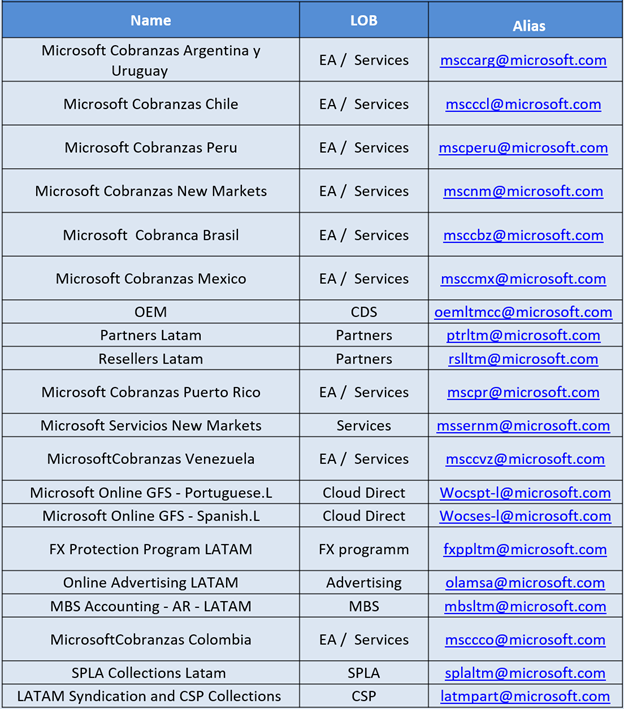
LATAM collections:
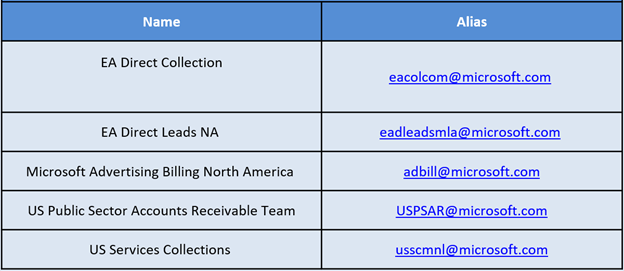
No Region Collections:
EMEA Collections:


Asia Collections:
