Note
Access to this page requires authorization. You can try signing in or changing directories.
Access to this page requires authorization. You can try changing directories.
Workspace outbound access protection helps safeguard your data by controlling outbound connections from Data Factory items in your workspace to external data sources. When this feature is enabled, Data Factory items are restricted from making outbound connections unless access is explicitly granted through approved data connection rules.
Understanding outbound access protection with Data Factory
The workspace admin first enables outbound access protection for the workspace, which blocks all outbound connections from dataflows by default.

Next, the workspace admin configures data connection rules for cloud or gateway connection policies. These rules specify which external sources are allowed, such as SQL Server and Azure Data Lake Storage (ADLS) Gen2 Storage. Once policies are set, dataflows can connect only to the approved destinations (in this example, SQL Server and ADLS Gen2 Storage), while all other outbound connections remain blocked.
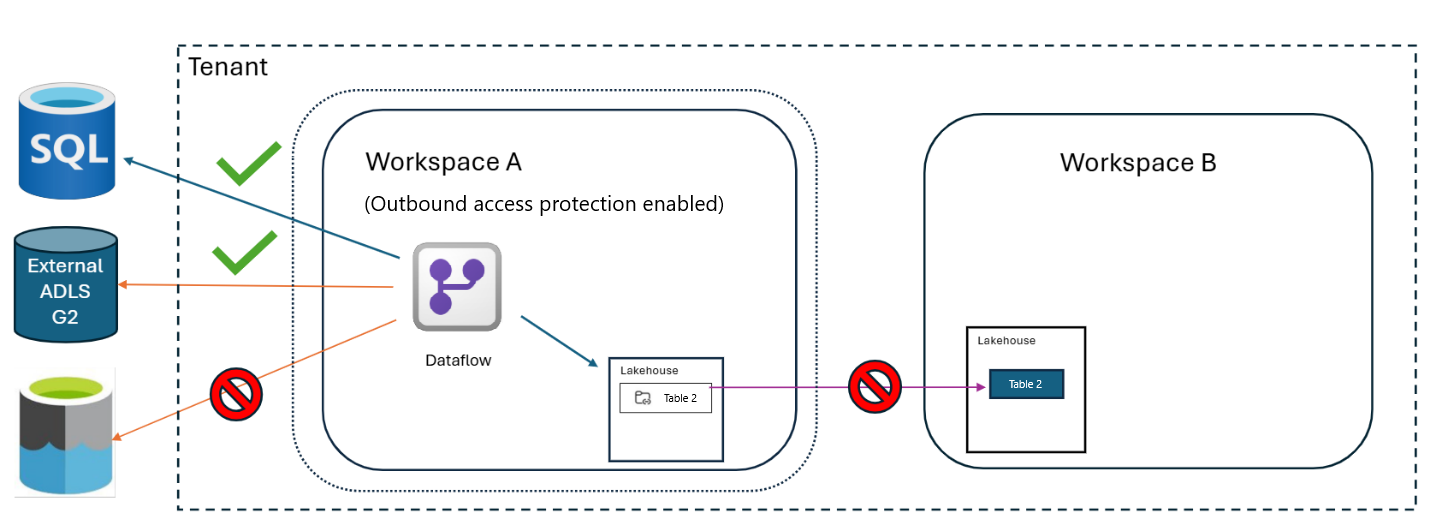
Configuring outbound access protection for Data Factory
You can only create an allow list using data connection rules; managed private endpoints aren't supported for Data Factory workloads. To configure outbound access protection for Data Factory:
Follow the steps to enable outbound access protection.
After enabling outbound access protection, you can set up data connection rules for cloud or gateway connection policies to allow outbound access to other workspaces or external resources as needed.
Once configured, Data Factory items can connect only to the approved destinations specified in the data connection rules, while all other outbound connections remain blocked.
Supported Data Factory item types
The following Data Factory item types are supported with outbound access protection:
- Dataflow Gen2 (with CI/CD)
- Pipelines
- Copy Jobs
The next section explains how outbound access protection affects several common Data Factory scenarios.
Common scenarios
Workspace outbound access protection affects how Data Factory items connect to other workspaces and external data sources. This section describes common scenarios that illustrate how outbound access protection affects these connections.
Internal Fabric connectors
The following tables summarize how workspace outbound access protection applies to Fabric connectors with and without workspace-level granularity.
Fabric connectors with workspace-level granularity
Fabric connector types that support workspace-level granularity include lakehouse, warehouse, Fabric SQL database, and dataflow. For these Fabric connectors, you can specify which destination workspaces are permitted for each connector.
| Source workspace | Destination workspace | Connector Type | Connector Setting | Result |
|---|---|---|---|---|
| A | A | Lakehouse | Allowed/Blocked | Connection is allowed to A because it's in the same workspace |
| A | B | Lakehouse | Connector allowed | Connection is allowed to B and all other lakehouses in the tenant |
| A | B | Lakehouse | Connector blocked (only workspace B is allowed) | Connection is allowed only to lakehouses in workspace B |
| A | B | Lakehouse | Connector blocked (only workspace C) | Connection to workspace B is blocked |
Fabric connectors without workspace-level granularity
Fabric connectors that don't support workspace-level granularity include all Fabric connectors except the types described in the previous section (such as when a data pipeline triggers a notebook). For these connectors, the allow list applies to all item types, and either allows or blocks all connections without workspace-specific exceptions.
| Data Pipeline workspace | Notebook workspace | Connector Type | Connector Setting (Allowed/Blocked) | Result |
|---|---|---|---|---|
| A | Any (including A) | Notebook | Allowed | The data pipeline can connect to the notebook because it's within the workspace boundary |
| A | Any | Notebook | Blocked | The data pipeline can't connect to the notebook because it's outside the workspace boundary |
External data sources
The following tables show how workspace outbound access protection applies to external connectors that support granular endpoint exceptions. By configuring exceptions, admins can permit or block specific external destinations.
External connector with granular endpoints exception
For external connectors that support endpoint-level granularity, such as ADLS Gen2 storage, you can specify individual destination endpoints as exceptions to outbound access restrictions.
| Dataflow workspace | Destination | Connector Type | Connector Setting | Result |
|---|---|---|---|---|
| A | SQL Server 1 | SQL Server | Blocked at connector level | Connection is blocked to SQL Server 1 |
| A | SQL Server 1 | SQL Server | Blocked at connector level with exception for SQL Server 1 | Connection is allowed to SQL Server 1 |
| A | SQL Server 1 | SQL Server | Allowed at connector level | Connection is allowed to all SQL Server instances |
External data source connectivity using granular endpoints exception
For external connectors that support granular endpoint exceptions for Azure Cosmos DB, you can allow or block connections to Azure Cosmos DB destinations.
| Dataflow workspace | Azure Cosmos DB destination | Connector Type | Connector Setting (Allowed/Blocked) | Result |
|---|---|---|---|---|
| A | Any | Azure Cosmos DB | Allowed | Dataflow can connect to any Azure Cosmos DB |
| A | Any | Azure Cosmos DB | Blocked | Dataflow can't connect to any Azure Cosmos DB |
Gateway and network connections
The following table summarizes how workspace outbound access protection applies to virtual network and on-premises data gateway connections.
Virtual network and on-premises data gateway connections
When you allow a gateway, dataflows can connect to any data source accessible through that gateway. All outbound connections made via the permitted gateway are allowed.
| Dataflow workspace | Connection type | Destination type | Connection Setting (Allowed/Blocked) | Result |
|---|---|---|---|---|
| A | VNet/OPDG | Any | Allowed | Dataflow connects to all virtual networks (VNets) and on-premises data gateways (OPDGs) |
| A | VNet/OPDG | Any | Blocked (no exceptions) | Dataflow can't connect to any VNet or OPDG |
| A | VNet/OPDG | VNet V1 | Blocked; only VNet V1 is an exception | Dataflow connects only to sources behind VNet V1 |
| A | VNet/OPDG | OPDG O1 | Blocked; only OPDG O1 is an exception | Dataflow connects only to sources behind OPDG O1 |
Considerations and limitations
Only the following Fabric connectors support workspace level granularity:
- Lakehouse
- Warehouse
- Fabric SQL DB
- Dataflows
Note
Other Fabric connectors like Datamarts and KQL Database don’t support workspace-level granularity.
Pipelines: Pipelines support only the following Fabric connectors:
- FabricDataPipeline
- CopyJob
- UserDataFunction
- PowerBIDataset
Pipeline activities: The Teams activity and Office 365 Outlook activity don't support outbound access protection.
Dataflows: For dataflows, cross-workspace Data Warehouse destinations aren't supported.
Lakehouses with default semantic models: Workspace outbound access protection isn't supported for lakehouses with default semantic models.
- To ensure the Lakehouse is compatible with outbound access protection, we recommend enabling outbound access protection on the workspace before creating a Lakehouse to ensure compatibility.
- Enabling outbound access protection on an existing workspace that already contains a Lakehouse (and its associated Semantic model) isn't supported.
Exploratory APIs in pipelines and Copy job: APIs used for Browse, Preview, and Test Connection operations don't support outbound access protection.
Workspace staging in pipelines: Internal staging scenarios using workspace staging don't work. Use external staging instead. Staging settings are configurable in the pipeline copy settings.
For other limitations, refer to Workspace outbound access protection overview - Microsoft Fabric.