Note
Access to this page requires authorization. You can try signing in or changing directories.
Access to this page requires authorization. You can try changing directories.
Applies to: ✅ Fabric Data Engineering and Data Science
Apache Spark workloads in Fabric Data Engineering and Data Science include lakehouse operations (for example, table preview and load to delta), notebook runs (interactive, scheduled, and pipeline-triggered), and Spark job definition runs. These workloads use workspace-associated capacity by default, and charges appear in Azure Cost Management for the linked subscription.
This article helps you understand:
- How Spark billing works on Fabric capacity, and how autoscale billing changes usage and cost reporting.
- How billing behavior differs between starter pools and custom Spark pools.
- Where to view Spark usage and cost, and how billing attribution works across workspaces and capacities.
For general Fabric billing guidance, see Understand your Azure bill on a Fabric capacity.
How Spark billing works on Fabric capacity
A Fabric capacity is purchased in Azure and associated with an Azure subscription. Capacity size determines available compute.
For Spark in Fabric, each capacity unit (CU) maps to two Spark vCores. For example, F128 provides 256 Spark vCores. Capacity is shared across all workspaces assigned to that capacity, so Spark compute is shared across jobs submitted from those workspaces.
For stock-keeping unit (SKU) details, core allocation, and queueing behavior, see Spark concurrency limits.
Autoscale billing for Spark
Autoscale billing for Spark introduces a flexible, pay-as-you-go billing model for Spark workloads in Microsoft Fabric. With this model enabled, Spark jobs use dedicated serverless resources instead of consuming compute from Fabric capacity. This serverless option optimizes cost and provides scalability without resource contention.
When enabled, autoscale billing allows you to set a maximum capacity unit (CU) limit, which controls your budget and resource allocation. Billing for Spark jobs is based solely on the compute used during job execution, with no idle compute costs. The cost per Spark job remains the same (0.5 CU hour), and you're charged only for the runtime of active jobs.
Key benefits of autoscale billing
- Cost efficiency: Pay only for the Spark job runtime.
- Independent scaling: Spark workloads scale independently of other workload demands.
- Enterprise-ready: Integrates with Azure Quota Management for flexible scaling.
How autoscale billing works
- Spark jobs no longer consume CU from the Fabric capacity and instead use serverless resources.
- A max CU limit can be set to align with budget or governance policies, ensuring predictable costs.
- Once the CU limit is reached, Spark jobs either queue (for batch jobs) or throttle (for interactive jobs).
- There is no idle compute cost, and only active job compute usage is billed.
For more details, see Autoscale Billing for Spark overview.
Billing behavior by compute option
Spark billing behavior depends on how Spark compute is configured.
Starter pools: These default pools are optimized for fast startup. Billing starts when notebook, Spark job definition, or lakehouse operations begin. Idle pool time isn't billed.
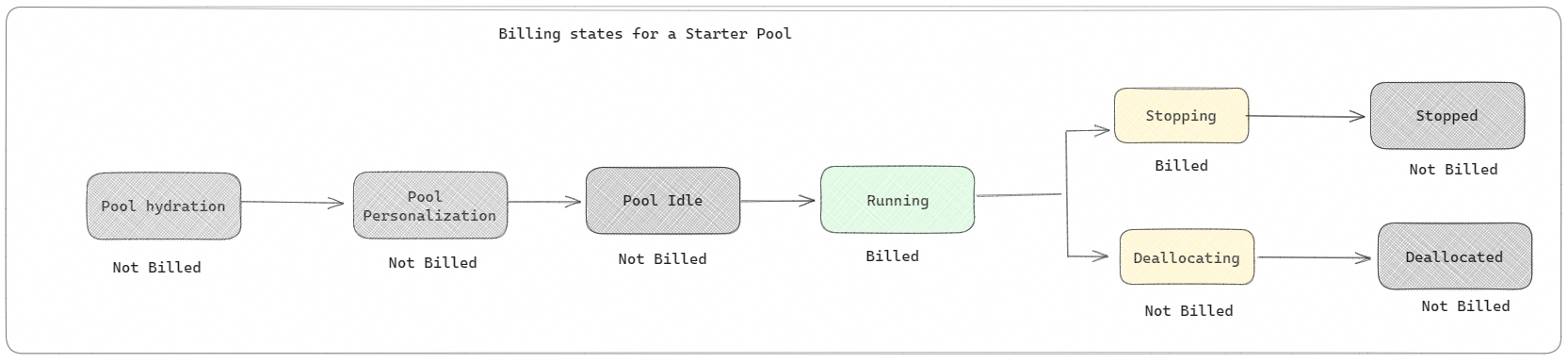
For example, if you submit a notebook job to a starter pool, you're billed only while the notebook session is active. Billed time doesn't include idle pool time.
To learn more, see Configure starter pools in Fabric.
Custom Spark pools: These pools let you choose node size and scaling settings for workload requirements. Creating a custom pool is free. Billing applies only when Spark compute is actively used.
- The size and number of nodes available for a custom Spark pool depend on your Fabric capacity.
- As with starter pools, billing applies to active session runtime, not cluster creation or deallocation stages.
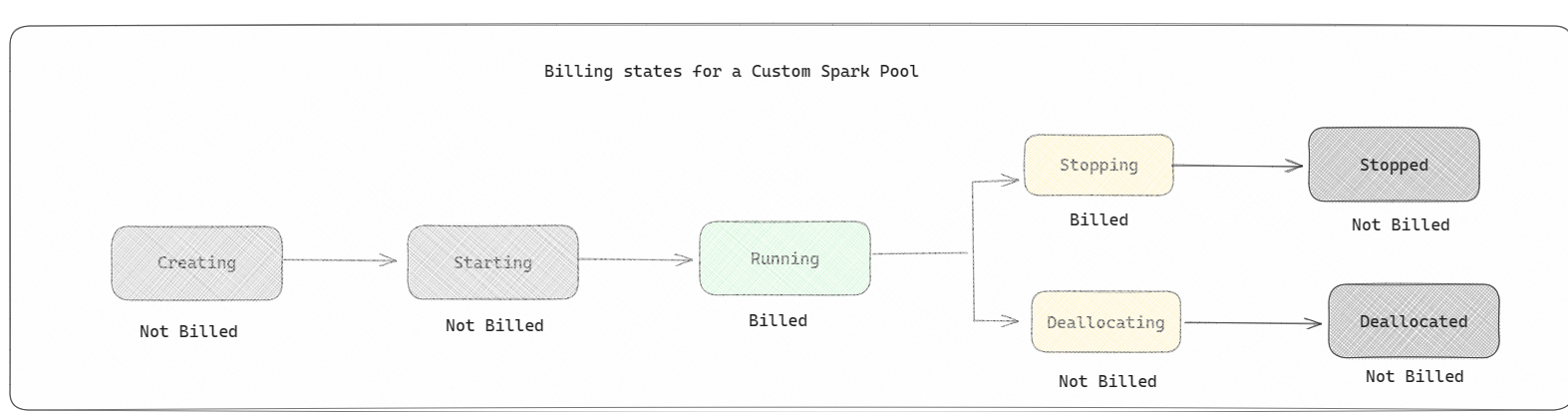
For example, if you submit a notebook job to a custom Spark pool, you're charged only while the session is active. Billing stops when the Spark session stops or expires. You aren't charged for cluster acquisition or Spark context initialization time.
To learn more, see Apache Spark compute in Microsoft Fabric.
Note
The default session expiration for starter and custom Spark pools is 20 minutes. If you don't use a Spark pool for 2 minutes after session expiration, the pool is deallocated. To stop session billing earlier, stop the session from the notebook Home menu or from Monitoring hub.
Where to view Spark usage and cost
Use two views together: the Capacity Metrics app for utilization, and Azure Cost Analysis for cost.
Spark usage in Capacity Metrics app
The Microsoft Fabric Capacity Metrics app provides visibility into capacity usage across Fabric workloads. Capacity admins use it to monitor workload performance and usage against purchased capacity.
After you install the app, select Notebook, Lakehouse, and Spark Job Definition in Select item kind. Then adjust the Multi metric ribbon chart timeframe to review usage trends for those items.
Spark operations are classified as background operations. Spark capacity consumption appears under notebook, Spark job definition, or lakehouse items, and is aggregated by operation name and item.
For example, for a notebook run, you can review runtime and CU usage in the report.

To learn more, see Monitor Apache Spark capacity consumption.
Spark cost in Azure Cost Analysis
When Autoscale Billing is enabled for Spark, usage is reported against the Autoscale for Spark Capacity Usage CU meter.
To track this usage in Azure Cost Analysis:
- Go to the Azure portal.
- Select the Subscription linked to your Fabric capacity.
- In the left pane, expand Cost Management, then select Cost analysis.
- Filter by the Fabric capacity resource.
- Select the meter Autoscale for Spark Capacity Usage CU.
- Review real-time Spark compute spend.
Billing attribution examples
Billing is attributed to the capacity associated with the workspace that runs the item.
Consider the following scenario:
- Capacity
C1hosts workspaceW1, and workspaceW1contains lakehouseLH1and notebookNB1. - Capacity
C2hosts workspaceW2, and workspaceW2contains Spark job definitionSJD1and lakehouseLH2.
With this baseline, billing attribution for Spark operations works as follows.
- Any Spark operation performed by notebook
NB1or lakehouseLH1is reported against capacityC1. - If Spark job definition
SJD1from workspaceW2reads data from lakehouseLH1, usage is reported against capacityC2, becauseW2hosts the running item. - If notebook
NB1performs a read operation from lakehouseLH2, capacity consumption is reported against capacityC1, becauseW1hosts the running item.
The following table summarizes billing attribution for different operations in this scenario.
| Example | Running item and read path | Billed capacity |
|---|---|---|
| 1 | NB1 or LH1 in W1 |
C1 |
| 2 | SJD1 in W2 reading LH1 in W1 |
C2 |
| 3 | NB1 in W1 reading LH2 in W2 |
C1 |
Related content
- Get started with Data Engineering and Data Science admin settings for your Fabric capacity
- Apache Spark workspace administration settings in Microsoft Fabric
- High concurrency mode in Apache Spark for Fabric
- Autoscale Billing for Spark overview
- Install the Premium metrics app
- Use the Premium metrics app