Note
Access to this page requires authorization. You can try signing in or changing directories.
Access to this page requires authorization. You can try changing directories.
The scope of this article is to describe configurations that enable outbound connectivity to public end points. The configurations are mainly in the context of high availability with Pacemaker for SUSE / RHEL.
If you're using Pacemaker with Azure fence agent in your high availability solution, then the virtual machines (VMs) must have outbound connectivity to the Azure management API. The article presents several options to enable you to select the option that's best suited for your scenario.
Overview
When you implement high availability for SAP solutions via clustering, one of the necessary components is Azure Load Balancer. Azure offers two load balancer SKUs: Standard and Basic.
Standard Azure load balancer offers some advantages over the Basic load balancer. For instance, Standard works across Azure Availability zones, has better monitoring and logging capabilities for easier troubleshooting, and reduced latency. The "high availability ports" feature covers all ports, making it no longer necessary to list all individual ports.
There are some important differences between the Basic and the Standard SKU of Azure load balancer. One of them is the handling of outbound traffic to public end point. For full Basic versus Standard SKU load balancer comparison, see Load Balancer SKU comparison.
When VMs without public IP addresses are placed in the backend pool of internal (no public IP address) Standard Azure load balancer, there's no outbound connectivity to public end points, unless extra configuration is performed.
A VM can establish outbound connectivity to public endpoints if a public IP address is assigned. The same applies when the VM is included in the backend pool of a load balancer with a public IP.
SAP systems often contain sensitive business data. It's rarely acceptable for VMs hosting SAP systems to be accessible via public IP addresses. At the same time, there are scenarios, which would require outbound connectivity from the VM to public end points.
Examples of scenarios, requiring access to Azure public end point are:
- Azure Fence Agent requires access to management.azure.com and login.microsoftonline.com
- Azure Backup
- Azure Site Recovery
- Using public repository for patching the operating system
- The SAP application data flow may require outbound connectivity to public end point
If your SAP deployment doesn’t require outbound connectivity to public end points, you don’t need to implement extra configuration. It's sufficient to create internal standard SKU Azure Load Balancer for your high availability scenario, assuming that there's also no need for inbound connectivity from public end points.
Note
When VMs without public IP addresses are added to the back-end pool of an internal Standard Azure Load Balancer, they lack outbound internet connectivity. Further configuration is needed to enable routing to public endpoints. VMs that have public IP addresses, or that are included in an Azure Load Balancer backend pool with a public IP, already have outbound access to public endpoints.
Prerequisites
Azure Standard Load Balancer:
- Azure Standard Load Balancer overview - Comprehensive overview of Azure Standard Load balancer, important principles, concepts, and tutorials.
- Outbound connections in Azure - Scenarios on how to achieve outbound connectivity in Azure.
- Load balancer outbound rules- Explains the concepts of load balancer outbound rules and how to create outbound rules.
Azure Firewall:
- Azure Firewall Overview- overview of Azure Firewall.
- Tutorial: Deploy and configure Azure Firewall - instructions on how to configure Azure Firewall via Azure portal.
- Virtual Networks - User defined rules - Azure routing concepts and rules.
- Security Groups Service Tags - how to simplify your Network Security Groups (NSG) and Firewall configuration with service tags.
Achieve outbound connectivity to public end points
Create another external Azure Standard Load Balancer for outbound connections to internet.
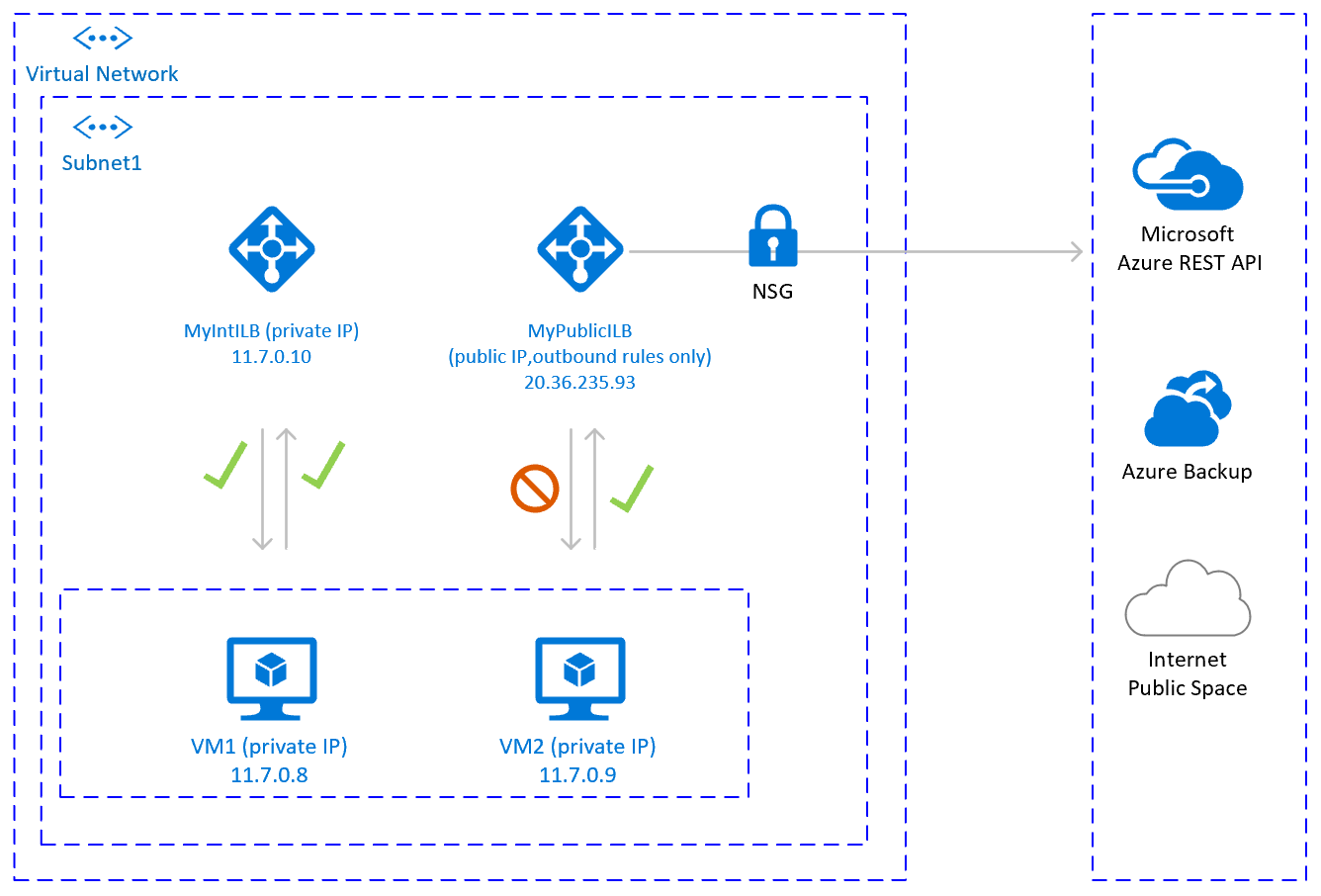
To achieve outbound connectivity to public end points, without allowing inbound connectivity to the VM from a public end point, is to create a second load balancer with a public IP address. Then you add the VMs to the backend pool of the second load balancer where only outbound rules are defined. Use Network Security Groups to control the public end points that are accessible for outbound calls from the VM. For more information, see Scenario 2 in Outbound connections.
The configuration would look like:
Important considerations
- You can use one extra Public Load Balancer for multiple VMs in the same subnet to achieve outbound connectivity to public end point and optimize cost.
- Use Network Security Groups to control which public end points are accessible from the VMs. You can assign the Network Security Group either to the subnet, or to each VM. Where possible, use Service tags to reduce the complexity of the security rules.
- Azure standard Load balancer with public IP address and outbound rules allows direct access to public end point. If you have corporate security requirements to have all outbound traffic pass via centralized corporate solution for auditing and logging, you may not be able to fulfill the requirement with this scenario.
Tip
Where possible, use Service tags to reduce the complexity of NSG.
Deployment steps
Create the Load Balancer.
In the Azure portal, select All resources, Add, then search for Load Balancer.
Select Create.
Load Balancer Name: MyPublicILB.
Select Public as a type, Standard as SKU.
Select Create Public IP address and specify as a name MyPublicILBFrondEndIP.
Select Zone Redundant as Availability zone.
Select Review and Create, then select Create.
Create the Backend pool MyBackendPoolOfPublicILB and add the VMs.
- Select the Virtual network.
- Select the VMs and their IP addresses and add them to the backend pool.
Create outbound rules.
az network lb outbound-rule create --address-pool MyBackendPoolOfPublicILB --frontend-ip-configs MyPublicILBFrondEndIP --idle-timeout 30 --lb-name MyPublicILB --name MyOutBoundRules --outbound-ports 10000 --enable-tcp-reset true --protocol All --resource-group MyResourceGroupCreate Network Security group rules to restrict access to specific Public End Points. If there's existing Network Security Group, you can adjust it. The following steps show how to enable access to the Azure management API:
- Navigate to the NSG.
- Select Outbound Security Rules.
- Add a rule to Deny all outbound Access to Internet.
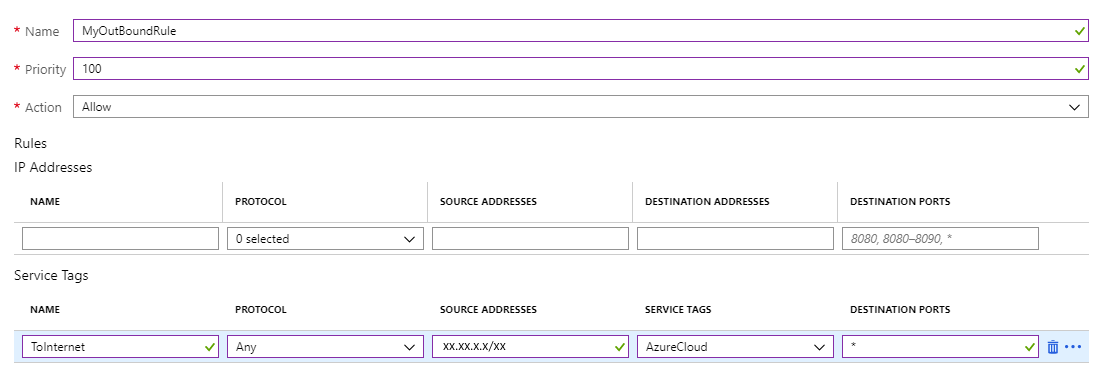
- Add a rule to Allow access to AzureCloud, with priority lower than the priority of the rule to deny all internet access.
The outbound security rules would look like:

For more information on Azure NSG, see Security Groups.

Other options
If outbound traffic is routed via third party, URL-based firewall proxy:
If using Azure fence agent, make sure the firewall configuration allows outbound connectivity to the Azure management API
https://management.azure.comandhttps://login.microsoftonline.com.If using SUSE's Azure public cloud update infrastructure for applying updates and patches, see Azure Public Cloud Update Infrastructure 101.