Note
Access to this page requires authorization. You can try signing in or changing directories.
Access to this page requires authorization. You can try changing directories.
Quantum algorithms are a mixture of quantum programming and classical programming. The quantum part includes qubits, quantum gates, and probabilistic measurements, while the classical part includes control flow constructs such as conditional logic and loops. Quantum circuit diagrams need to incorporate elements from both quantum and classical programming.
The Microsoft Quantum Development Kit (QDK) creates interactive circuit diagrams for Q# and OpenQASM programs that show how classical control groups affect the structure of your circuit.
For information on how to create circuit diagrams with the QDK in VS Code, see How to visualize quantum circuit diagrams with the QDK
Classical control groups in quantum circuit diagrams
In some quantum algorithms, the circuit changes depending on the result of a mid-circuit measurement. For example, the circuit applies a gate to a specific qubit only if the measurement result for another qubit is 1. Or, the circuit iterates over a loop until the measurement result for a specific qubit is 0.
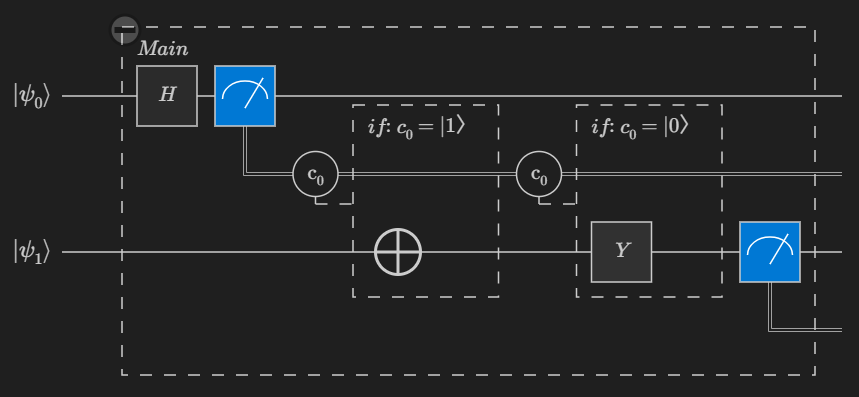
For example, the following two-qubit Q# program puts a qubit into a superposition state, measures the qubit, and then applies a different gate to the other qubit depending on the measurement result of the first qubit.
import Std.Measurement.*;

operation Main() : Result[] {
    use q0 = Qubit();
    use q1 = Qubit();

    H(q0);

    let r = M(q0);

    if r == One {
        X(q1);
    } else {
        Y(q1);
    }

    let r1 = M(q1);

    [r, r1]
}
The circuit diagram for this program looks like this:
Tip
Select an element in the circuit diagram to highlight the code that creates the circuit element.
Circuit diagram block types
QDK circuit diagrams have two types of blocks, quantum operation blocks and classical control group blocks. Some blocks are collapsible. To collapse or expand a block, select the +/- icon at the top left corner of the block.
Quantum operation blocks
Each object in your program that applies quantum gates or measurements to qubits has its own block in the circuit diagram. For Q# programs, these objects include operations, functors, and lambdas. Each operation block shows the name of the Q# or OpenQASM object that corresponds to that block.
Classical control flow blocks
Each conditional statement and loop in your program has its own block in the circuit diagram.
Conditional blocks
Conditional blocks are preceded by a condition icon $C_n$, where each conditional statement in the program is identified by a unique subscript number.

Each conditional block is labeled with the condition that, if true, causes that part of the circuit to run during the program.
Loop blocks
Loop blocks are labeled with loop: 1.. N, where N is the number of iterations of the loop. To view the circuit for each iteration of the loop, select the expansion icon in the loop block.