Note
Access to this page requires authorization. You can try signing in or changing directories.
Access to this page requires authorization. You can try changing directories.
In this sprint, you can now filter the Sprint board and Sprint backlog by additional fields, including custom fields, bringing them in line with the filtering experience already available on the product backlog and Boards.
In Azure Pipelines, we've added finer-grained control over comment requirements for PR validation runs from GitHub forks, a new stage index panel for faster navigation of complex CD pipelines, and the option to cancel paused runs when re-enabling a pipeline.
Check out the release notes for details.
Azure Boards
Azure Pipelines
- Finer-grained comment requirement for running PR validation runs from GitHub repositories
- Faster pipeline stage navigation
- Enable pipeline and cancel paused runs
Wiki
Azure Boards
Filter sprint boards and backlogs by additional fields
Following the introduction of additional filters for boards and backlogs, we've now completed a long-standing request from the developer community to extend this capability to sprint boards and sprint backlogs as well.
Teams can now use additional fields, including custom fields, to filter sprint boards and backlogs, making it easier to find and focus on the right work during sprint planning and execution. This enhancement addresses a highly requested feature originally raised in the Azure DevOps Developer Community.

Azure Pipelines
Finer-grained comment requirement for running PR validation runs from GitHub repositories
To help protect your pipelines against unauthorized use, you can require comments from team members or contributors prior to running PR validation runs.
Before this sprint, the comment requirement applied for PRs from both within the repository and from forked repositories. To improve velocity, you may want to require team member comments only for PR validation runs originating from forked repositories. Alas, this was not possible.
Starting this sprint, you can configure comment requirements independently, per PR source. In the following example, comments are required only for PRs originating from repository forks.

Faster pipeline stage navigation
Navigating complex CD pipelines is tedious. Such pipelines can have tens or even hundreds of stages. Knowing the state of each stage becomes more difficult as the pipeline progresses, because later stages don't fit on the screen.
Starting with this sprint, Azure Pipelines shows you a stage index on the left side of the stages map, making it easier to navigate to the stage you're interested in.
Imagine you have a pipeline with 32 stages, organized in a ring fashion. The stages in the last ring may not fit on screen. You may have to scroll down and right to get to the last stage.

With the stages side panel, navigation becomes easier. You can scroll vertically to the stage you're interested in and click on it to go to it.

Enable pipeline and cancel paused runs
Enabling a paused or disabled pipeline can cause compute resource waste, when a large number of pipeline runs are resumed.
Starting with this sprint, when you enable a pipeline, you have the option to enable the pipeline but cancel the paused runs. The option to enable the pipeline and resume the runs is still available.

Wiki
Standard Mermaid syntax in Markdown editors
Mermaid diagrams in Azure DevOps Markdown now support the standard fenced code block syntax (```mermaid), in addition to the existing ::: mermaid syntax. This change reduces the need to maintain different Markdown formats across tools and makes it easier to author wiki pages, pull requests, and work items that include Mermaid diagrams.
Content authored with the standard ```mermaid syntax in GitHub, VS Code, or other Markdown editors now renders consistently in Azure DevOps without requiring conversion. Existing diagrams using the ::: mermaid syntax continue to work.
This change addresses a long-standing Developer Community suggestion.
Next steps
Note
These features will roll out over the next two to three weeks. Head over to Azure DevOps and take a look.
How to provide feedback
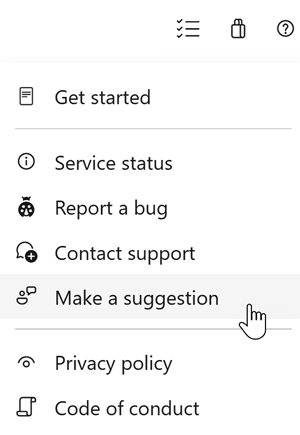
We would love to hear what you think about these features. Use the help menu to report a problem or provide a suggestion.
You can also get advice and your questions answered by the community on Stack Overflow.