Note
Access to this page requires authorization. You can try signing in or changing directories.
Access to this page requires authorization. You can try changing directories.
Azure Container Apps provides built-in service discovery and routing so your container apps can communicate with each other without managing infrastructure. When you deploy multiple container apps to the same environment, the platform handles DNS resolution, load balancing, and secure traffic routing automatically.
If ingress is enabled, each container app gets a domain name. You can make that endpoint available publicly or restrict it to other container apps in the same environment.
Container apps can reach each other through any of these methods:
- Fully qualified domain name (FQDN) : the default generated domain
- App name: a short-form
http://<APP_NAME>address for internal calls - Dapr service invocation: a sidecar-based approach with built-in retries and observability
- Custom domain: your own domain name with a managed certificate
Note
When you call another container app in the same environment by using the FQDN or app name, network traffic never leaves the environment.
Why it matters
In a microservices architecture, services need to call each other reliably. Azure Container Apps removes the operational burden of setting up service discovery, managing DNS records, and configuring reverse proxies.
Here's what the platform handles for you:
- Automatic DNS registration: Every container app gets a resolvable hostname as soon as it's deployed.
- Proxy-managed routing: All inter-app traffic flows through a built-in Envoy proxy layer that handles TLS termination, traffic splitting, and load balancing.
- Environment-scoped isolation: Internal endpoints are only reachable from within the same environment, creating a natural security boundary.
- Protocol flexibility: Communication over HTTP/1.1, HTTP/2 (for gRPC), or raw TCP depending on your workload needs.
These capabilities mean you can focus on your application logic rather than networking plumbing.
Container app location (FQDN)
Each container app's fully qualified domain name is composed of the app name, a unique environment identifier, and the region. These domain fragments all fall under the azurecontainerapps.io top-level domain.
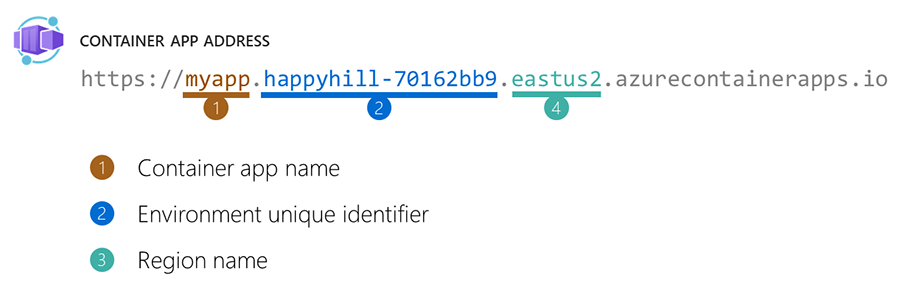
External and internal FQDNs
The ingress visibility setting controls whether your app is reachable from outside the environment:
| Visibility | FQDN pattern | Reachable from |
|---|---|---|
| External | <APP_NAME>.<ENVIRONMENT_UNIQUE_ID>.<REGION>.azurecontainerapps.io |
Anywhere (public internet) |
| Internal | <APP_NAME>.internal.<ENVIRONMENT_UNIQUE_ID>.<REGION>.azurecontainerapps.io |
Same environment only |
When you set ingress to internal, the FQDN includes an .internal. segment. Other container apps in the same environment can still reach the app using this address, but requests from outside the environment receive a 404 response from the environment's proxy. The DNS name resolves to the environment's shared IP, but the proxy rejects the request because the app is internal-only.
Get fully qualified domain name
The az containerapp show command returns the fully qualified domain name of a container app.
az containerapp show \
  --resource-group <RESOURCE_GROUP_NAME> \
  --name <CONTAINER_APP_NAME> \
  --query properties.configuration.ingress.fqdn
In this example, replace the placeholders surrounded by <> with your values.
The value returned from this command resembles a domain name like the following example:
myapp.happyhill-70162bb9.canadacentral.azurecontainerapps.io
Revision label FQDNs
When you assign labels to specific revisions, each label gets its own unique FQDN using a triple-dash separator:
<APP_NAME>---<LABEL>.<ENVIRONMENT_UNIQUE_ID>.<REGION>.azurecontainerapps.io
For internal apps, the pattern includes the .internal. segment:
<APP_NAME>---<LABEL>.internal.<ENVIRONMENT_UNIQUE_ID>.<REGION>.azurecontainerapps.io
Label FQDNs let you send traffic to a specific revision directly. This practice is useful for testing new versions, running A/B experiments, or providing stable endpoints for specific revision deployments.
Call a container app by name
The most straightforward way to call another container app from within the same environment is by its name. Send a request to http://<CONTAINER_APP_NAME>, and the environment's built-in DNS resolves the name automatically.
http://my-backend-api
How DNS resolution works
Behind the scenes, Azure Container Apps uses a custom DNS configuration that translates container app names into routable addresses. When your app makes a request to another app's name or FQDN:
- The environment's DNS server resolves the hostname to the Envoy proxy service address.
- The Envoy proxy identifies the target app from the original hostname.
- The proxy routes the request to the correct revision(s) based on your traffic configuration.
This architecture means container apps never communicate directly with each other's pods. All traffic passes through the proxy layer, which provides TLS termination, load balancing, and traffic splitting.
Tip
Use the short app name (http://<APP_NAME>) for calls between container apps in the same environment. It's simpler than the full FQDN and works the same way since the DNS resolves both patterns through the same proxy.
Transport protocols
Container apps support three transport modes for ingress, configured through the transport property:
| Transport | Use case | Details |
|---|---|---|
| Auto (default) | Standard web APIs and services | Negotiates HTTP/1.1 and HTTP/2 automatically |
| HTTP/2 | gRPC services | Enables HTTP/2 end-to-end, required for gRPC |
| TCP | Non-HTTP protocols (databases, custom protocols) | Raw TCP connections with port mapping |
Note
External TCP ingress requires a custom VNet. If you try to create an external TCP app without a custom VNet, you receive a ContainerAppTcpRequiresVnet error. Internal TCP ingress works without a custom VNet.
When you use TCP transport, you can also expose extra ports beyond the primary ingress port. Each extra port creates a separate TCP endpoint that other apps in the environment can connect to.
Traffic splitting and revision routing
Azure Container Apps supports three revision modes that affect how traffic is distributed between container apps:
| Mode | Behavior |
|---|---|
| Single | All traffic goes to the latest active revision. |
| Multiple | Traffic splits across revisions by percentage, based on your traffic rules. |
| Labels | Each labeled revision gets a unique FQDN for direct access. |
In multiple mode, when another container app calls your app's FQDN, the proxy automatically distributes requests across revisions according to your configured weights. In labels mode, callers can target a specific revision using its label FQDN.
For more information, see Revisions in Azure Container Apps.
Dapr service invocation
Dapr (Distributed Application Runtime) provides a sidecar-based approach to inter-app communication. By enabling Dapr, your container apps gain built-in service invocation with mutual TLS, automatic retries, and distributed tracing through Azure Application Insights.

How Dapr invocation works
Each Dapr-enabled container app runs a sidecar process alongside your application. To call another Dapr-enabled app, make a local HTTP request to the Dapr sidecar, which handles service discovery and routing:
http://localhost:3500/v1.0/invoke/<DAPR_APP_ID>/method/<METHOD_NAME>
For example, to call the catalog method on an app with a Dapr App ID of order-processor:
http://localhost:3500/v1.0/invoke/order-processor/method/catalog
The sidecar resolves the target app through a dedicated DNS domain and routes the request through the Envoy proxy layer. This is the same infrastructure that handles FQDN-based routing.
Note
Dapr uses its own DNS resolution path (the .dapr domain) separate from the standard FQDN resolution. Both paths route through the environment's proxy infrastructure.
Dapr App ID
The Dapr App ID is the identity other apps use to invoke your service. If you don't set an explicit App ID, the Dapr runtime defaults to your container app name. The ARM API shows appId: null when you don't configure a custom ID, but the runtime applies the app name automatically. Set a custom App ID in your Dapr configuration if you need a different identifier.
Dapr App IDs must be unique within an environment. If you try to deploy a container app with a Dapr App ID that's already in use by another app, the container app resource is created but its revision fails to provision (provisioningState: Failed). The error message identifies the conflicting App ID and the app that owns it.
Dapr-only apps (no HTTP ingress)
You can enable Dapr on a container app without configuring HTTP ingress. In this case, the app isn't reachable through an FQDN or app name, but other Dapr-enabled apps can still invoke it through Dapr service invocation. This pattern is useful for background workers or event processors that only need to receive calls from other services in the mesh.
Tip
When you create a no-ingress app with the Azure CLI, omit both the --ingress and --target-port flags. Including --target-port without --ingress returns a usage error.
Dapr sidecar configuration
You configure the Dapr sidecar through your container app's properties. Key settings include:
| Setting | Description |
|---|---|
appId |
The Dapr App ID (defaults to the container app name) |
appPort |
The port your app listens on (falls back to the ingress target port) |
appProtocol |
Protocol for Dapr-to-app communication (for example, http, grpc) |
logLevel |
Dapr sidecar log verbosity |
enableApiLogging |
Whether to log Dapr API calls |
httpMaxRequestSize |
Maximum request body size in MB for Dapr's HTTP server |
httpReadBufferSize |
Maximum size of the HTTP read buffer in KB |
For more information on configuring Dapr with Azure Container Apps, see Dapr integration with Azure Container Apps.
Security for inter-app communication
Azure Container Apps includes several security features that affect how container apps communicate:
- TLS by default: All traffic between container apps routes through the Envoy proxy, which handles TLS termination. Set
allowInsecuretofalse(the default) to enforce HTTPS redirects. - Client certificate mode (mTLS): Configure mutual TLS by setting the client certificate mode to
require,accept, orignore. - IP restrictions: Define allow or deny rules to restrict which IP addresses can reach your app.
- CORS policies: Configure cross-origin resource sharing rules for browser-based clients calling your container apps.
Note
When you use Dapr service invocation, the Dapr sidecars automatically secure communication with mutual TLS between services. You don't need to configure mTLS separately for Dapr-to-Dapr calls.
For more information, see Ingress in Azure Container Apps.
Custom domains
You can map your own domain names to a container app by configuring custom domains on the ingress settings. Each custom domain can reference a managed or uploaded TLS certificate.
Custom domains are registered alongside the default FQDN, so your app responds to both addresses. When other container apps in the environment need to reach your app, they can use either the default FQDN, the app name, or your custom domain.
For more information, see Custom domains in Azure Container Apps.
Sample solution
A sample showing how to call between containers using both the FQDN and Dapr is available on Azure Samples.
Related concepts
Understanding inter-app communication in Azure Container Apps connects to several related topics:
- Environments in Azure Container Apps: The shared boundary where container apps discover and communicate with each other
- Ingress in Azure Container Apps: How to configure external and internal endpoints, TLS, and routing rules
- Dapr integration with Azure Container Apps: Deeper coverage of Dapr components, pub/sub, and state management alongside service invocation
- Networking in Azure Container Apps: VNet integration, private endpoints, and network security for your environment
- Revisions in Azure Container Apps : How revision modes and traffic splitting affect inter-app routing