Note
Access to this page requires authorization. You can try signing in or changing directories.
Access to this page requires authorization. You can try changing directories.
Azure API Management
Azure DevOps
Azure Pipelines
GitHub
APIOps is a methodology that applies the concepts of GitOps and DevOps to API deployment. Like DevOps, APIOps helps team members easily make changes and deploy them in an iterative and automated way. This architecture demonstrates how you can improve the entire API life cycle and API quality by using APIOps.
Architecture
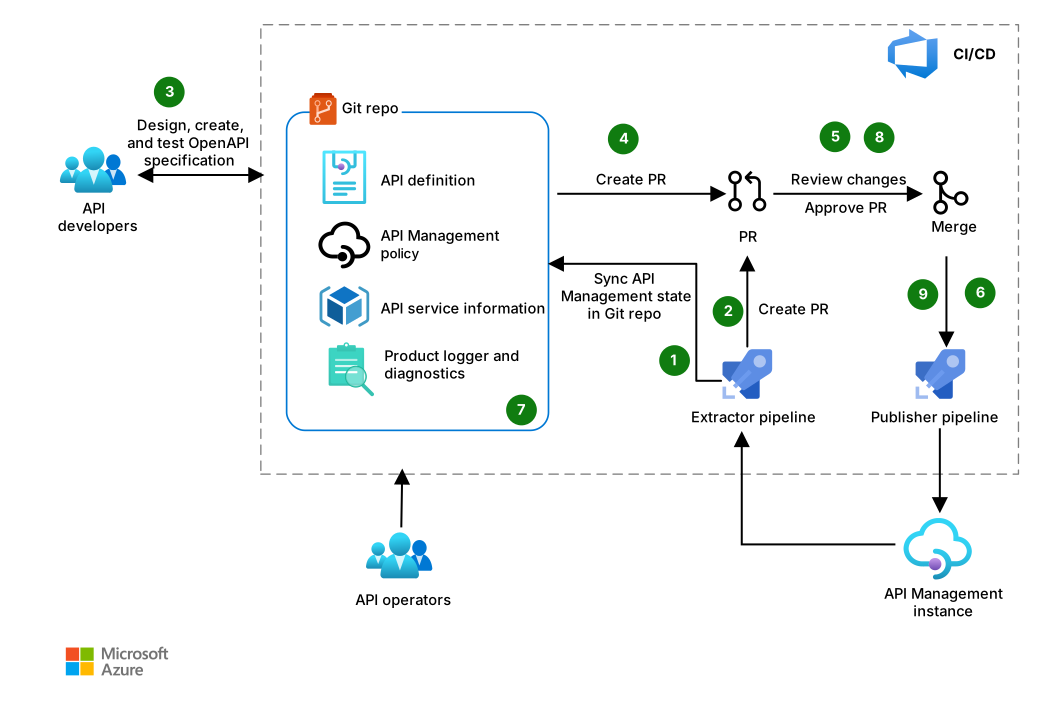
Download a Visio file of this architecture.
Workflow
API operators run the extractor pipeline to sync the Git repository with the Azure API Management instance and populate the Git repository with API Management objects in the required format.
If an API change is detected in the API Management instance, a pull request (PR) is created for operators to review. Operators merge the changes into the Git repository.
API developers clone the Git repository, create a branch, and create API definitions by using a tool like OpenAPI specification.
If a developer pushes changes to the repository, a PR is created for review.
The PR can be automatically approved or reviewed, depending on the required control level.
After changes are approved and merged, the publishing pipeline deploys the latest changes to the API Management instance.
API operators create and modify API Management policies, diagnostics, products, and other relevant objects, and then commit the changes.
The changes are reviewed, and they're merged after approval.
After the changes are merged, the publishing pipeline deploys the changes by using the API-definitions process.
Components
API Management is a managed service that creates consistent API gateways for back-end services. In this architecture, it routes API calls, verifies credentials, enforces usage quotas, and logs metadata. It serves as the central platform for API management and publication.
Azure DevOps is a suite of development tools and services that manages the development life cycle. In this architecture, it supports planning, code management, and automated deployment of APIs so that teams can collaborate and streamline API delivery.
Azure Pipelines is a cloud-based service that supports continuous integration and continuous delivery (CI/CD). In this architecture, it automatically tests, builds, and deploys API changes to the API Management instance.
Azure Repos is a set of version control tools, including standard Git, that you can use to manage your code. In this architecture, it stores API definitions, policies, and configurations. It serves as the single source of truth for all changes and supports auditability and collaboration through PRs.
Alternatives
This solution supports Azure Repos to provide Git functionality and Azure Pipelines for CI/CD workflows.
It also supports GitHub for source control and collaboration, and it supports GitHub Actions to automate build, test, and deployment pipelines.
You can use any comparable technologies that provide similar version control and CI/CD capabilities.
Scenario details
APIOps uses version control to manage APIs and create an audit trail of changes to APIs, policies, and operations.
API developers who use an APIOps methodology review and audit APIs earlier and more frequently. These developers catch and resolve deviations from API standards faster, which improves specifications and API quality. The more APIs that you build and deploy by using an APIOps approach, the greater the consistency between APIs.
Potential use cases
Organizations that develop and manage APIs. You can use APIOps with only one exposed API in API Management.
Highly regulated sectors like insurance, banking, finance, and government.
Considerations
These considerations implement the pillars of the Azure Well-Architected Framework, which is a set of guiding tenets that you can use to improve the quality of a workload. For more information, see Well-Architected Framework.
Security
Security provides assurances against deliberate attacks and the misuse of your valuable data and systems. For more information, see Design review checklist for Security.
This solution provides several security benefits. Individual developers and operators don't directly access the API Management instance to apply changes or updates. Instead, users push changes to a Git repository, and the extractor and publishing pipelines read and apply them to the API Management instance. This approach follows the security best practice of least privilege because teams don't have write permissions in the API Management service instance. In diagnostic or troubleshooting scenarios, you can grant elevated permissions for a limited time on a case-by-case basis.
To make sure the API Management instances use best practices for security, you can extend this solution to enforce API best practices by using non-Microsoft tools and unit testing. Teams can provide early feedback via PR review if the proposed changes to an API or policy violate standards.
Set up repository permissions and consider the following security measures in Git repositories that sync to API Management instances:
PR review: Use branches, and protect the branches that represent the state of the API Management instances from directly pushed changes. Require that PRs have at least one reviewer.
Immutable history: Only accept new commits on top of existing changes. Immutable history is especially important for auditing purposes.
Multifactor authentication: Require users to activate multifactor authentication.
Signed commits: Only accept signed commits that can't be altered later.
Cost Optimization
Cost Optimization focuses on ways to reduce unnecessary expenses and improve operational efficiencies. For more information, see Design review checklist for Cost Optimization.
Use the Azure pricing calculator to estimate the costs of the Azure components in this architecture.
Consider Azure DevOps licensing costs for APIOps implementation. Users who participate in the APIOps process need an Azure DevOps license. For details, see Azure DevOps pricing.
For GitHub pricing and licensing details, see GitHub pricing and GitHub Enterprise licensing.
Operational Excellence
Operational Excellence covers the operations processes that deploy an application and keep it running in production. For more information, see Design review checklist for Operational Excellence.
APIOps can increase DevOps productivity for API development and deployments. You can use Git operations to roll back changes that behave unexpectedly. Use the commit graph for post-change analysis.
API operators often manage multiple environments for the same set of APIs. Several stages of an API can be deployed to different API Management instances or to a shared API Management instance. The Git repository, which is the single source of truth, shows which application versions are currently deployed to a cluster.
If someone makes a PR in the Git repository, the API operator knows that they have new code to review. For example, if a developer takes the OpenAPI specification and builds the API implementation, they add this new code to the repository. The operators can review the PR to check that the submitted API meets best practices and standards.
API Management landscapes are becoming more complex. This solution helps to:
- Maintain an overview of all environments and API Management instances.
- Track critical changes to APIs and policies.
- Create an audit trail for all deployed changes.
Deploy this scenario
For step-by-step guidance on extractor and publisher pipeline configuration, see the APIOps for API Management documentation.
The deployment workflow:
- Extracts API configurations from API Management.
- Creates PRs for review.
- Publishes approved changes by using CI/CD pipelines.
Contributors
Microsoft maintains this article. The following contributors wrote this article.
Principal authors:
- Wael Kdouh | Senior Principal Solution Architect
- Rishabh Saha | Senior Principal Solution Architect
To see nonpublic LinkedIn profiles, sign in to LinkedIn.