Hi Sean Green
Thank you for reaching out to the Q&A Forum.
Since the tool is missing from your "Add apps" section, it is highly likely that your Connected Experiences settings were reset during a recent update. "My Templates" is a cloud-backed feature, and if these specific privacy settings are disabled, the button will completely vanish from the client.
Here are some recommended steps you can consider trying:
Check "Optional Connected Experiences":
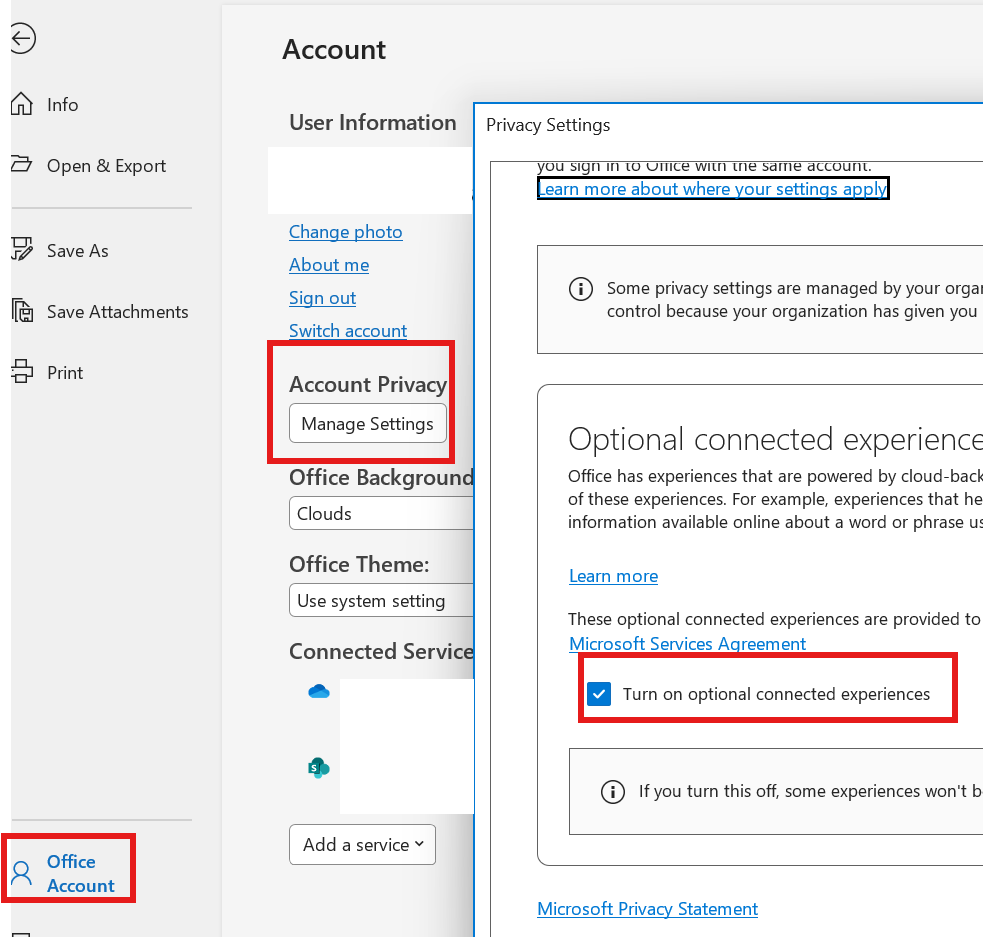
Open Outlook and go to File > Office Account > Under "Account Privacy," select Manage Settings > Scroll down to the section titled Connected Experiences. and ensure that "Turn on optional connected experiences" is checked > Click OK and restart Outlook.
Force Sync via Outlook on the Web (OWA)
If the setting above was already on, you can try to force the desktop client to recognize the app by toggling it in the web version.
- Log into your email via a browser at outlook.office.com.
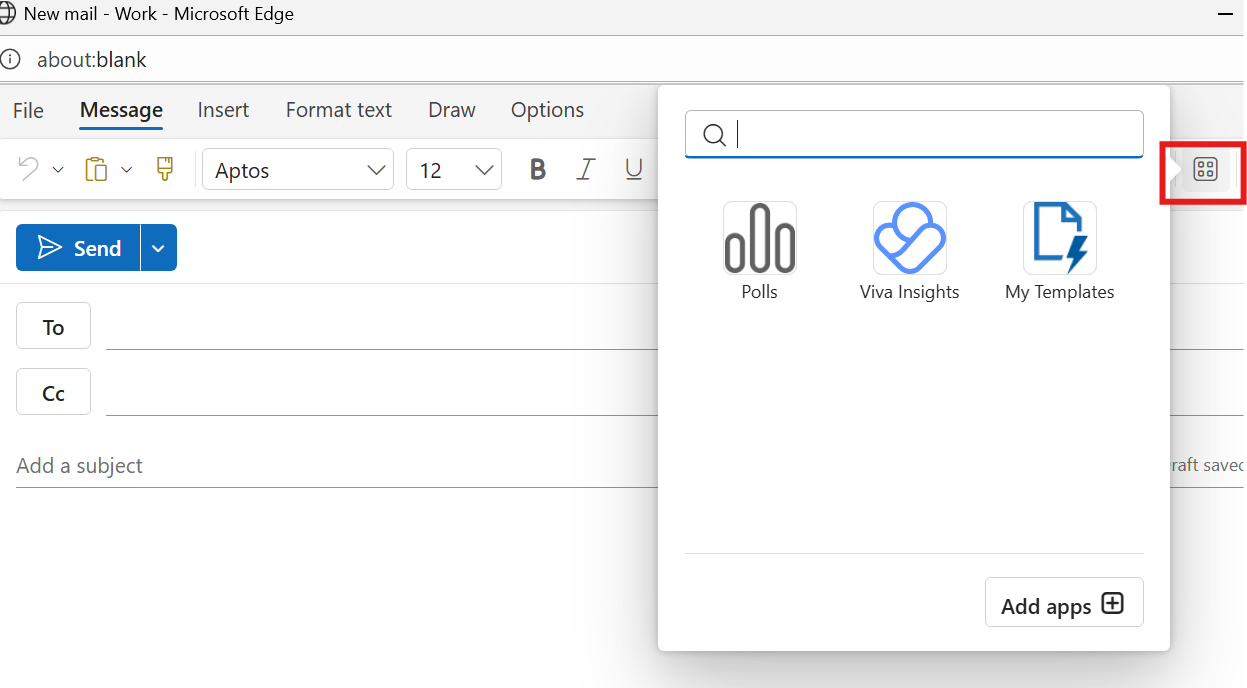
- Start a New Email > Locate the Apps icon (or the three dots
...) in the message toolbar and select Add apps
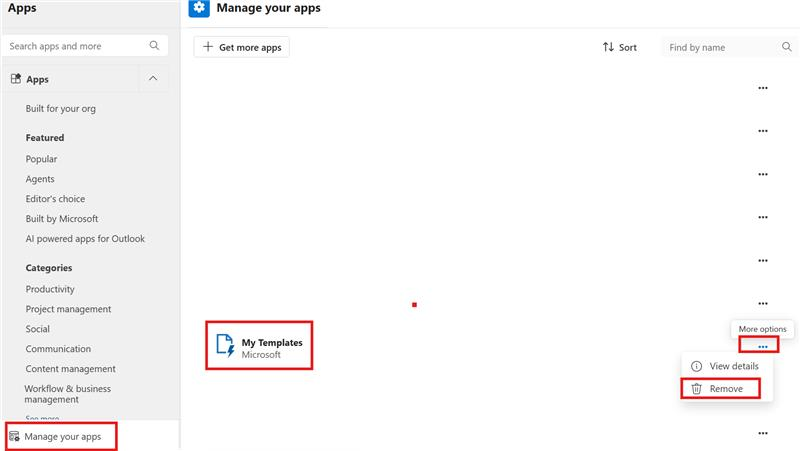
- Go to Manage your apps > Find My Templates to add. If it is already added, try removing it and re-adding it.
- Restart your Desktop Outlook.
Admin Restrictions
If you cannot find "My Templates" even in the web version, it is possible your organization's IT Admin has disabled the use of "User-owned apps and services" or the Office Store. In this case, you would need to contact your internal IT helpdesk.
I hope this information proves helpful!
If the answer is helpful, please click "Accept Answer" and kindly upvote it. If you have extra questions about this answer, please click "Comment".
Note: Please follow the steps in our documentation to enable e-mail notifications if you want to receive the related email notification for this thread.
' cx='32' cy='32' r='32' /%3E%3Ctext x='50%25' y='55%25' dominant-baseline='middle' text-anchor='middle' fill='%23FFF' %3ESG%3C/text%3E%3C/svg%3E)

' cx='32' cy='32' r='32' /%3E%3Ctext x='50%25' y='55%25' dominant-baseline='middle' text-anchor='middle' fill='%23FFF' %3EJM%3C/text%3E%3C/svg%3E)
' cx='32' cy='32' r='32' /%3E%3Ctext x='50%25' y='55%25' dominant-baseline='middle' text-anchor='middle' fill='%23FFF' %3ERS%3C/text%3E%3C/svg%3E)
' cx='32' cy='32' r='32' /%3E%3Ctext x='50%25' y='55%25' dominant-baseline='middle' text-anchor='middle' fill='%23FFF' %3ESC%3C/text%3E%3C/svg%3E)
' cx='32' cy='32' r='32' /%3E%3Ctext x='50%25' y='55%25' dominant-baseline='middle' text-anchor='middle' fill='%23FFF' %3EA%3C/text%3E%3C/svg%3E)
' cx='32' cy='32' r='32' /%3E%3Ctext x='50%25' y='55%25' dominant-baseline='middle' text-anchor='middle' fill='%23FFF' %3ELJ%3C/text%3E%3C/svg%3E)
' cx='32' cy='32' r='32' /%3E%3Ctext x='50%25' y='55%25' dominant-baseline='middle' text-anchor='middle' fill='%23FFF' %3EMS%3C/text%3E%3C/svg%3E)
' cx='32' cy='32' r='32' /%3E%3Ctext x='50%25' y='55%25' dominant-baseline='middle' text-anchor='middle' fill='%23FFF' %3EML%3C/text%3E%3C/svg%3E)
' cx='32' cy='32' r='32' /%3E%3Ctext x='50%25' y='55%25' dominant-baseline='middle' text-anchor='middle' fill='%23FFF' %3EHN%3C/text%3E%3C/svg%3E)
' cx='32' cy='32' r='32' /%3E%3Ctext x='50%25' y='55%25' dominant-baseline='middle' text-anchor='middle' fill='%23FFF' %3EVM%3C/text%3E%3C/svg%3E)
