Share via

How can i find the junk folder for my Email in Outlook?

Leroy McLaurin 0 Reputation points
2025-07-29T18:04:37.6533333+00:00

How can I find the junk folder for my Email in Outlook?

Outlook | Windows | Classic Outlook for Windows | For home
0 comments No comments

5 answers

Sort by: Most helpful
  1. Peter Kingsland 0 Reputation points
    2026-04-08T18:21:21.93+00:00

    I have been having the same problem - some legitimate emails go to my junk email file. When I go to open my junk email files to find the good ones, there is no icon on the left to click on. I don't know why this has happened. It used to be very easy to open my junk emails; now it has become impossible.


  2. walter mirosh 0 Reputation points
    2026-01-28T17:35:01.7066667+00:00

    Well you didn't help with my problem

    How do I view my BLOCKED Senders list

    0 comments No comments

  3. walter mirosh 0 Reputation points
    2026-01-28T17:32:01.12+00:00

    It said go to Junk and then you can see your Blocked mail?

    0 comments No comments

  4. Chloe-L 11,540 Reputation points Microsoft External Staff Moderator
    2025-08-06T22:03:06.7933333+00:00

    Good day! I hope you're doing well!  

    It has been a while and I am writing to see how things are going with your issue. Have you had a chance to check the reply provided? Are you encountering any difficulties following the steps? Please feel free to let me know if there’s anything I can assist you with. 

    Warm Regards, 

    Chloe L. | Microsoft Q&A Support Specialist


  5. Chloe-L 11,540 Reputation points Microsoft External Staff Moderator
    2025-07-29T22:44:28.7866667+00:00

    Hi @Leroy McLaurin,

    Thanks for using Microsoft product and posting in the Microsoft Q&A.

    Here's how to locate junk folder in classic Outlook:

    1. Open your Outlook desktop application.
    2. Look at the left-hand pane where your mail folders are listed.
    3. Scroll down the list of folders. You should see a folder named "Junk Email" (or sometimes just "Junk").
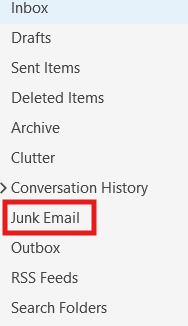
    image (1)

    Thank you again for your patience and for choosing Microsoft Q&A forum. Please let me know if there’s anything else I can assist you with.
    If the answer is helpful, please click "Accept Answer" and kindly upvote it. If you have extra questions about this answer, please click "Comment".   

    Best regards   

    Chloe L. | Microsoft Q&A Support Specialist


Your answer

Answers can be marked as 'Accepted' by the question author and 'Recommended' by moderators, which helps users know the answer solved the author's problem.