Bemærk
Adgang til denne side kræver godkendelse. Du kan prøve at logge på eller ændre mapper.
Adgang til denne side kræver godkendelse. Du kan prøve at ændre mapper.
This article describes how to use Bicep and a deployment script to pause a deployment until a resource property returns a specific value. You can use this technique to ensure that a deployment succeeds if the deployed resource reports to Azure Resource Manager that it's ready, but the underlying resources aren't. In this case, the deployed resource isn't yet ready to interact with the rest of the deployment, which means a pause is required.
This article uses an Azure Virtual WAN scenario to demonstrate the technique. The following files include a resource check and pause implementation:
You can adapt the files for your deployment. To help you, the azResourceStateCheck.bicep module is parameterized. The dependsOn property is used in orchestration.bicep to ensure that the vwanvhcs.bicep module deployment depends on the azResourceStateCheck.bicep module deployment.
Architecture
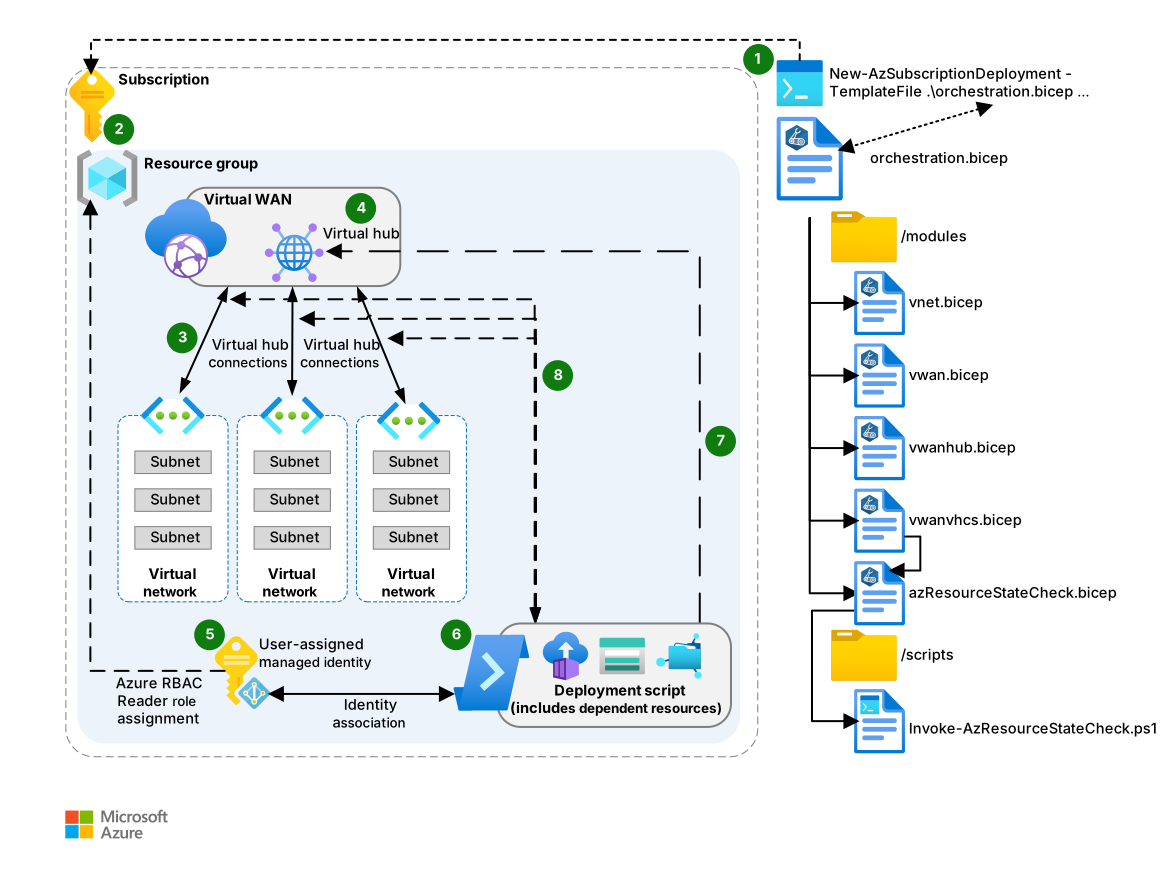
Download a Visio file of this architecture.
Review and download the code samples in GitHub for this architecture.
Submit the orchestration.bicep file for deployment to Resource Manager at the subscription scope.
Note
You can get this Bicep file and the other files that are used for this example from the infra/samples/deployment-scripts-property-check directory. A partial organization of the files in the repo appears on the right-hand side of the architecture diagram.
The orchestration.bicep file creates a resource group at the subscription scope.
The orchestration.bicep file deploys the Virtual WAN and the spoke virtual networks.
orchestration.bicep deploys the vwan.bicep module, which deploys the Virtual WAN at the resource group scope.
orchestration.bicep deploys the vnet.bicep module, which deploys the virtual networks at the resource group scope.
The Virtual WAN and spoke virtual networks are deployed in parallel because Bicep regards them as independent of one another. Dependencies determine the order of deployment in Bicep. A resource is deployed before any resource that depends on it. For more information about resource dependencies in Bicep, including explicit and implicit dependencies, see Resource dependencies in Bicep.
The orchestration.bicep file deploys the vwanhub.bicep module, which deploys the Virtual WAN hub at the resource group scope. The hub depends implicitly on the Virtual WAN, which means that the hub deployment occurs only after the Virtual WAN deployment completes.
The orchestration.bicep file deploys the azResourceStateCheck.bicep module, which creates a user-assigned managed identity and assigns the Azure role-based access control (RBAC) Reader role to the resource group.
The azResourceStateCheck.bicep module deploys the deployment script resource.
The deployment script resource uses the user-assigned managed identity for Resource Manager authentication. The resource then runs the PowerShell deployment script, Invoke-AzResourceStateCheck.ps1. For more information about deployment scripts, see Use deployment scripts in Bicep.
The script polls the Virtual WAN hub
routingStateproperty to determine whether the value isProvisioned:If the property value isn't
Provisioned, the script pauses for a duration specified by a parameter set in the orchestration.bicep file and is passed to the azResourceStateCheck.bicep module. The script then checks theroutingStateproperty value again.The script repeats the pause-and-check cycle. A parameter in the orchestration.bicep file determines the maximum number of iterations. If the property value isn't
Provisionedafter the maximum number of iterations, the script generates an exception and exits, which causes the remainder of the Bicep deployment to stop and fail.If the property value is
Provisioned, the deployment script exits with a success code(0).
If the deployment script succeeds, the orchestration.bicep file deploys the vwanvhcs.bicep module, which creates the connections between the spoke virtual networks and the Virtual WAN hub.
The definition of the vwanvhcs.bicep module that's in orchestration.bicep has a
dependsOnclause that causes vwanvhcs.bicep to depend explicitly on the successful completion of the azResourceStateCheck.bicep module. Therefore, the connections are created only if theroutingStateproperty isProvisioned.The vwanvhcs.bicep module deploys the Virtual WAN hub connections sequentially, rather than in parallel, because parallel deployment isn't supported for a single Virtual WAN hub. To set the batch size to
1, the module uses the BicepbatchSizedecorator,@batchSize(1). This decorator ensures that the connections are deployed one at a time.
Scenario details
The key parts of this architecture are the azResourceStateCheck.bicep module, which deploys the deployment script resource, and the associated deployment script Invoke-AzResourceStateCheck.ps1, which is a PowerShell file. The module uses the deployment script to check the value of a resource property. In this example, the resource is a Virtual WAN hub.
You can use dependsOn to make one module depend explicitly on another because this environment is deployed from a single file that uses Bicep modules. In this example, dependsOn makes the vwanvhcs.bicep module depend on the azResourceStateCheck.bicep module.
The following excerpt from orchestration.bicep shows dependsOn in use:
@description('The API version of the Azure Resource you need to use to check the state of a property.')
param parAzResourceApiVersion string = '2022-01-01'

@description('The property of the resource that you need to check. This is a property inside the `properties` bag of the resource that's captured from a GET call to the Resource ID.')
param parAzResourcePropertyToCheck string = 'routingState'

@description('The value of the property of the resource that you need to check.')
param parAzResourceDesiredState string = 'Provisioned'

@description('The duration that the deployment script waits between check or polling requests to check the property and its state, if it is not in its desired state. The duration defaults to `30` seconds.')
param parWaitInSecondsBetweenIterations int = 30

module modVWANHub 'modules/vwanHub.bicep' = {
  scope: rsg
  name: 'deployVWANHub'
  params: {
    region: region
    regionNamePrefix: regionNamePrefix
    defaultTags: defaultTags
    vwanHubCIDR: vwanHubCIDR
    vwanName: modVWAN.outputs.vwanName
  }
}

module modVWANHubRouterCheckerDeploymentScript 'modules/azResourceStateCheck.bicep' = {
  scope: rsg
  name: 'deployVWANHubRouterChecker'
  params: {
    parLocation: region
    parAzResourceId: modVWANHub.outputs.outVwanVHubId
    parAzResourceApiVersion: parAzResourceApiVersion
    parAzResourcePropertyToCheck: parAzResourcePropertyToCheck
    parAzResourceDesiredState: parAzResourceDesiredState
    parMaxIterations: parMaxIterations
    parWaitInSecondsBetweenIterations: parWaitInSecondsBetweenIterations
  }
}

module modVWanVhubVnetConnections 'modules/vwanVhcs.bicep' = {
  dependsOn: [
    modVWANHubRouterCheckerDeploymentScript
  ]
  scope: rsg
  name: 'deployConnectVnetsToVWANVHub'
  params: {
    vnets: vnets
    regionNamePrefix: regionNamePrefix
  }
}
The resource check is required because deployed Virtual WAN hubs aren't ready for use until the routingState property has the value of Provisioned. Virtual WAN hubs report successful deployment to Resource Manager so that the deployment engine continues deployment. A new Virtual WAN hub becomes operational after the Virtual WAN hub router is provisioned into the created hub. This process takes around 15 minutes. This behavior can be seen in the following screenshot of a new Virtual WAN hub. The screenshot shows a hub status of Succeeded but a routing status of Provisioning.

If you try to deploy the vwanvhcs.bicep module before the routingState value is Provisioned, connection creation fails and overall deployment fails. Until the router is provisioned, redeployment attempts also fail.
The following screenshot shows an example of the deployment script log during routingState checks of the Virtual WAN hub. The log shows repeated checks of the property that return a value other than Provisioned.
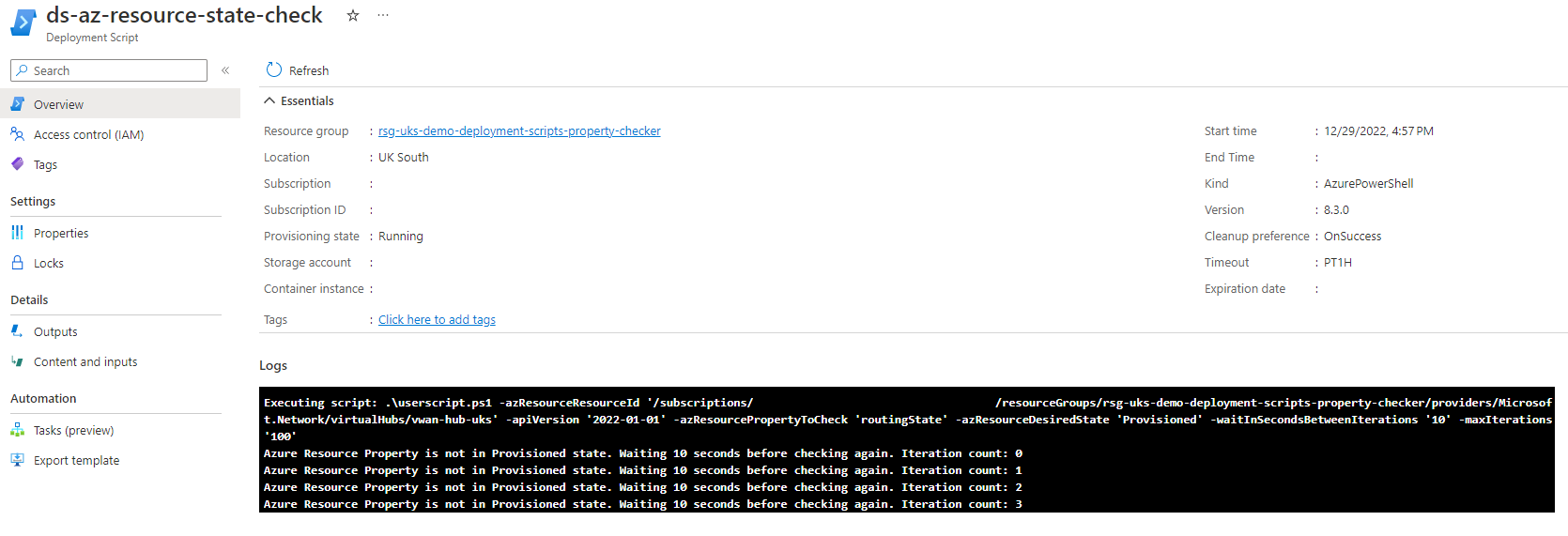
The following screenshot shows that the value changes to Provisioned.

If the value doesn't change to Provisioned after the maximum number of iterations, the script generates an exception, which signals the script resource failure to Resource Manager. The Resource Manager deployment engine fails and stops the deployment because the exception suggests that there's a problem with the Azure resource that requires troubleshooting. For more information, see the following Invoke-AzResourceStateCheck.ps1 script.
[CmdletBinding()]
param (
  [string]
  $azResourceResourceId,

  [string]
  $apiVersion = "2022-05-01",

  [string]
  $azResourcePropertyToCheck = "provisioningState",

  [string]
  $azResourceDesiredState = "Provisioned",

  [int]
  $waitInSecondsBetweenIterations = 30,

  [int]
  $maxIterations = 30
)

$totalTimeoutCalculation = $waitInSecondsBetweenIterations * $maxIterations

$azResourcePropertyExistenceCheck = Invoke-AzRestMethod -Method GET -Path "$($azResourceResourceId)?api-version=$($apiVersion)"

if ($azResourcePropertyExistenceCheck.StatusCode -ne "200") {
  $DeploymentScriptOutputs["azResourcePropertyState"] = "Not Found"
  throw "Unable to get Azure Resource - $($azResourceResourceId). Likely it doesn't exist. Status code: $($azResourcePropertyExistenceCheck.StatusCode) Error: $($azResourcePropertyExistenceCheck.Content)"
}

$azResourcePropertyStateResult = "Unknown"
$iterationCount = 0

do {
  $azResourcePropertyStateGet = Invoke-AzRestMethod -Method GET -Path "$($azResourceResourceId)?api-version=$($apiVersion)"
  $azResourcePropertyStateJsonConverted = $azResourcePropertyStateGet.Content | ConvertFrom-Json -Depth 10
  $azResourcePropertyStateResult = $azResourcePropertyStateJsonConverted.properties.$($azResourcePropertyToCheck)

  if ($azResourcePropertyStateResult -ne $azResourceDesiredState) {
    Write-Host "Azure Resource Property ($($azResourcePropertyToCheck)) is not in $($azResourceDesiredState) state. Waiting $($waitInSecondsBetweenIterations) seconds before checking again. Iteration count: $($iterationCount)"
    Start-Sleep -Seconds $waitInSecondsBetweenIterations
    $iterationCount++
  }
} while (
  $azResourcePropertyStateResult -ne $azResourceDesiredState -and $iterationCount -ne $maxIterations
)

if ($azResourcePropertyStateResult -eq $azResourceDesiredState) {
  Write-Host "Azure Resource Property ($($azResourcePropertyToCheck)) is now in $($azResourceDesiredState) state."
  $DeploymentScriptOutputs["azResourcePropertyState"] = "$($azResourceDesiredState)"
}

if ($iterationCount -eq $maxIterations -and $azResourcePropertyStateResult -ne $azResourceDesiredState) {
  $DeploymentScriptOutputs["azResourcePropertyState"] = "Azure Resource Property ($($azResourcePropertyToCheck)) is still not in desired state of $($azResourceDesiredState). Timeout reached of $($totalTimeoutCalculation) seconds."
  throw "Azure Resource Property ($($azResourcePropertyToCheck)) is still not in $($azResourceDesiredState) state after $($totalTimeoutCalculation) seconds."
}
Contributors
Microsoft maintains this article. The following contributors wrote this article.
Principal author:
- Jack Tracey | Senior Cloud Solutions Architect
Other contributor:
- Gary McMahon | Senior Cloud Solutions Architect
To see nonpublic LinkedIn profiles, sign in to LinkedIn.
Next steps
- Files for the example in the Azure/CAE-Bits repo
- Use deployment scripts in Bicep
- Learn module: Extend Bicep and ARM templates using deployment scripts
- Everything you wanted to know about exceptions
- Migrate to Virtual WAN
- Resource dependencies in Bicep
- Bicep documentation